
SWMIS Platform
5. System Modules and Platform Overview
The Solid Waste Management Information System (SWMIS) consists of multiple integrated modules designed to support end-to-end waste management operations, regulatory oversight, and performance monitoring.
This section provides a comprehensive overview of all system modules and functionalities as accessible from a full administrative (Superuser) perspective.
The purpose of this overview is to present the complete structure of the platform before introducing role-based access permissions and user-specific functionalities in the subsequent sections.
Each module plays a specific role in supporting operational workflows, regulatory compliance, data management, reporting, and strategic decision-making across municipalities, institutions, and other stakeholders involved in the solid waste management sector.
5.1 Monitoring
5.1.1 Dashboard
5.1.1.1 Collection Overview Dashboard
The Collection Overview Dashboard serves as the primary operational dashboard for monitoring waste collection activities across the waste management chain. It provides high-level indicators and analytical insights that support operational monitoring, anomaly detection, and performance assessment.
Key Performance Indicators (KPIs)
| KPI | Description |
|---|---|
| Total Waste Received | Aggregate tonnage of all collection manifests recorded during the selected period, including the total number of operations. |
| Total Facilities Output | Aggregate tonnage of all transfer manifests generated by facilities, including the total number of operations. |
| Collection Manifest Anomalies | Number of detected anomalies in collection manifests (e.g. overweigh or underweight loads), including the number of active or unresolved cases. |
| Illegal Dumping Reports | Total number of illegal dumping reports submitted thru the platform, including the number of unresolved reports. |
Detailed Analytics
The Dashboard also provides analytical insights through the following data visualizations:
Top Facilities
Ranked list of the top 10 facilities based on the total waste received displaying both tonnage and percentage comparison bar.
Top Generators
Ranked list of the top 10 waste generators based on the total volume of waste generated.
Top Transporters
Ranked list of the top 10 transporters based on total waste transported, including the number of transport trips performed.
Waste Input by Type
A Chart visualization displaying the tonnage distribution by waste type (e.g., Municipal Solid Waste, Construction Debris, Organic Waste, etc.).
Scope Indicator
The dashboard clearly indicates whether the displayed data represents:
- Nationwide data (Ministry-wide scope), or
- Data filtered to a specific municipality or administrative jurisdiction.
This allows users to understand the geographical scope of the displayed indicators and analytics.
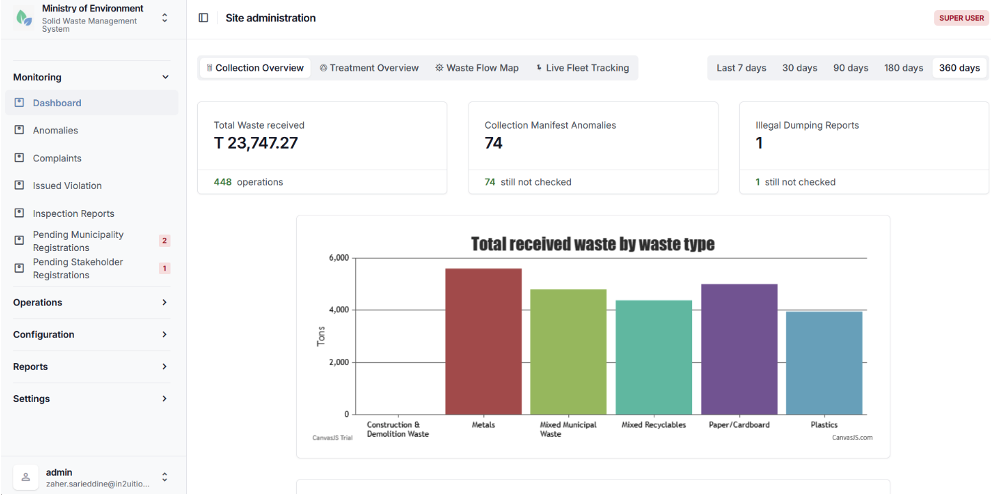
Collection Overview Dashboard
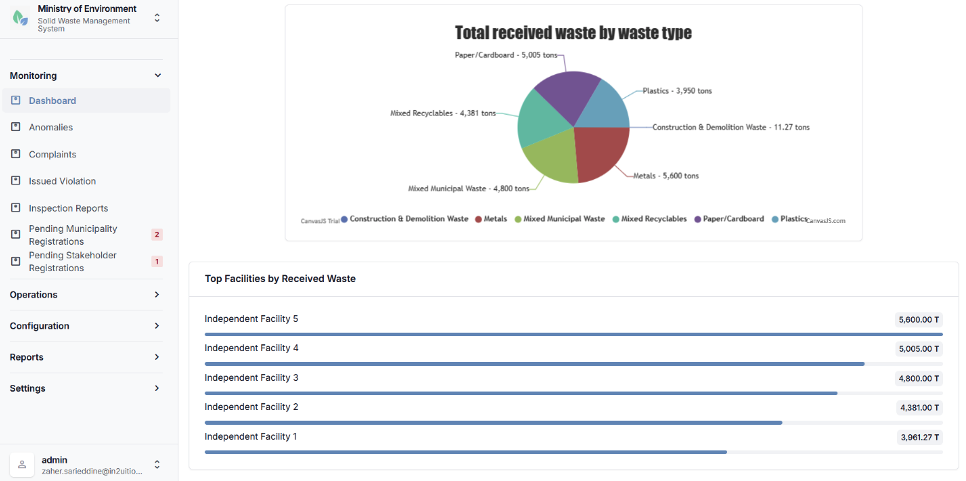
Collection Overview Dashboard
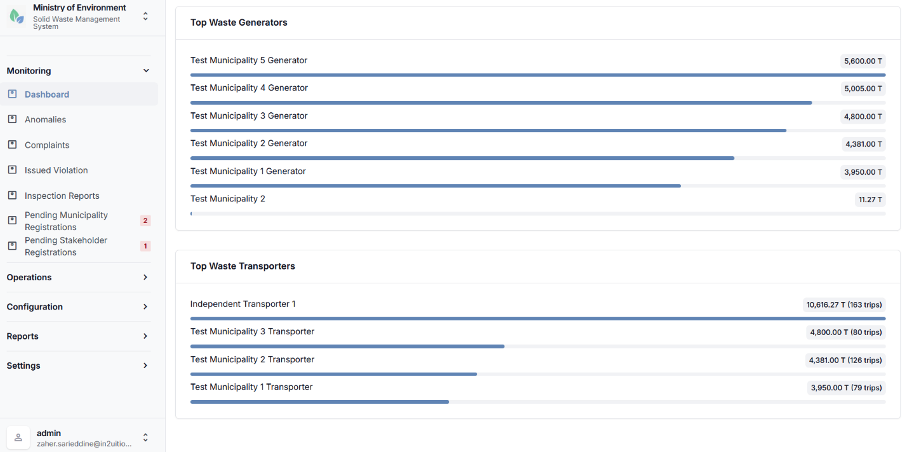
Collection Overview Dashboard
5.1.1.2 Treatment Overview Dashboard
The Treatment Overview Dashboard focuses on monitoring waste processing, treatment, and transfer activities occurring at waste management facilities. It provides analytical insights into the movement of waste between facilities and the distribution of waste across different treatment and disposal methods.
This dashboard supports operational monitoring, performance analysis, and oversight of waste treatment processes across the system.
Key Metrics
Total Output by Waste Type
A Chart displaying the total tonnage of waste transferred from facilities, broken down by waste type (e.g., municipal waste, construction debris, organic waste, hazardous waste, etc.).
Output by Recipient Type
A Chart categorizing outbound transfers according to the receiving treatment or disposal method, such as:
- Recycling
- Composting
- Energy recovery
- Other treatment processes
- Final disposal (Landfill)
Transfer Counts and Averages
Displays the total number of transfer operations recorded within the selected period, including:
- Total transferred tonnage
- Average weight per transfer
- Trend indicators over time
Highest generating Source and Destination Facilities
Identifies the highest-volume waste flows between facilities by highlighting the facilities generating the largest outbound transfers and the facilities receiving the highest volumes of waste.
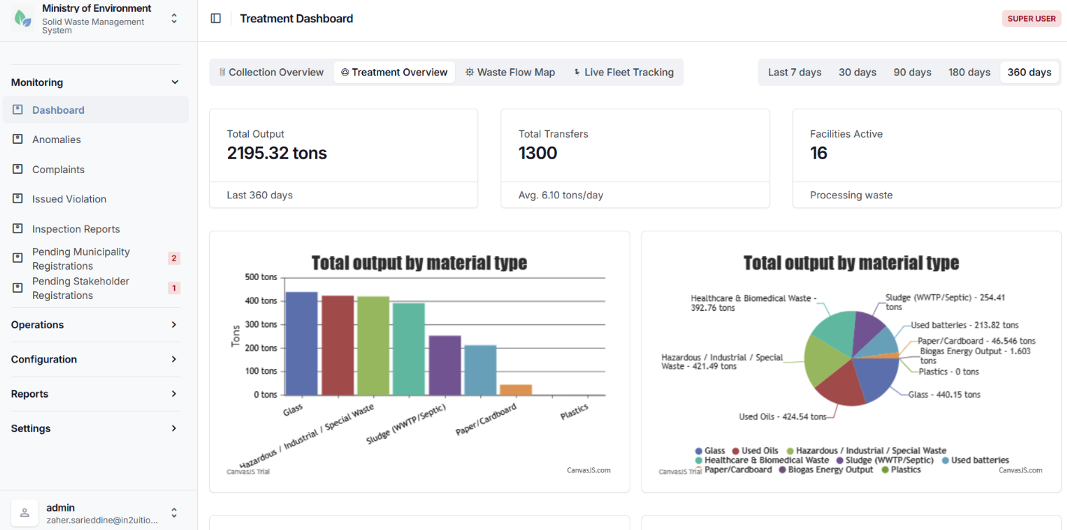
Treatment Overview Dashboard
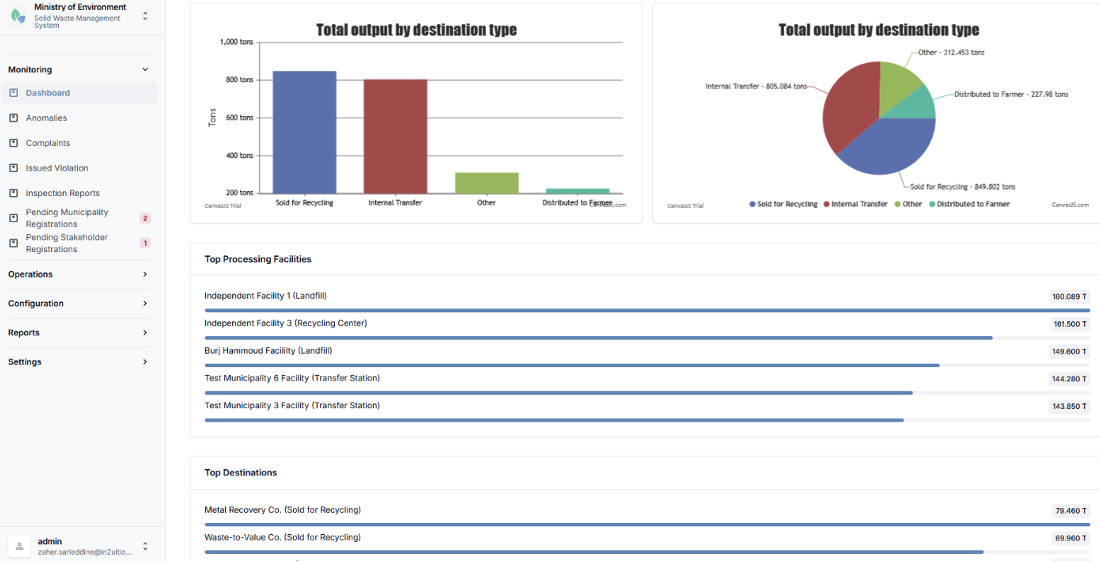
Treatment Overview Dashboard
5.1.1.3 Waste Flow Map
The Waste Flow Map provides an interactive geographic visualization of waste movements between waste generators and waste management facilities. The map enables users to analyze spatial waste flows, identify key waste sources and destinations, and understand the distribution of waste transport activities across the system.
The map interface is built on Google Maps-based platform and allows users to interact with markers, connections, and clusters to explore detailed operational data.
Map Features:
Generator Markers (Orange)
Orange markers represent waste generators. Selecting a marker displays detailed information including the generator name, the total volume of waste generated, and the list of connected receiving facilities.
Facility Markers (Blue)
Blue markers represent waste treatment, transfer or disposal facilities. Selecting a marker displays the facility name, the total volume of waste received, and the list of connected generators.
Waste flow connections (Green Polylines)
Green lines illustrate waste transport routes between generators and facilities. The thickness of the line represents the relative volume of waste transported along that connection.
Marker clustering
In areas with a high density of markers, generators and facilities are grouped into clusters represented by green circles displaying the number of contained locations. Users can click a cluster to zoom in and view the cluster details.
Connection Line Details
Selecting a connection line displays detailed information about the waste flow, including the source location, destination facility, total transported weight, and the breakdown of transported waste by type.
Summary Statistics Cards
| Card | Description |
|---|---|
| Waste Generators | Total number of waste generators displayed on the map within the selected scope and period.[FM1] [S2] |
| Waste Facilities | Total number of waste management facilities shown on the map. |
| Active Connections | Number of active generator-to-facility waste transport connections represented on the map. |
| Total Waste Transported | Aggregate tonnage of waste transported across all connections during the selected reporting period. |
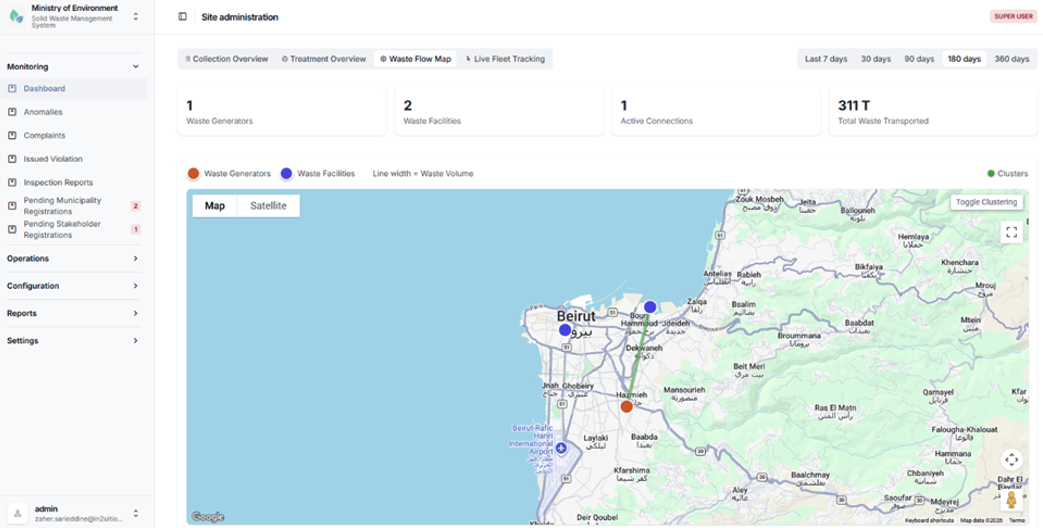
Waste Flow Map
5.1.1.4 Live Fleet Tracking Dashboard
The Live Fleet Tracking Dashboard provides real-time monitoring of waste collection vehicles equipped with GPS tracking devices. This dashboard allows authorized personnel to monitor vehicle movements, review operational activity, and support coordination of waste collection operations.
Features
Vehicle Grouping by Transporter
Collection vehicles are organized by transporter or stakeholder. For each vehicle, the system displays key details including vehicle code, license plate number, vehicle type, and load capacity.
Real-Time Map Tracking
Vehicles equipped with a Trax GPS device ID are displayed on an interactive map showing their current geographic location.
Vehicle Tracking History
Users can access historical tracking data for individual vehicles, including location history by date and recorded odometer readings.
Operational Oversight
The dashboard supports operational monitoring of collection fleets, enabling authorities to verify vehicles activity, monitor routes, and oversee transport operations.
Access Control
Access to the Live Fleet Tracking Dashboard is restricted to authorized operational staff and is typically available only to Ministry officials and municipal dispatch personnel responsible for monitoring collection activities.
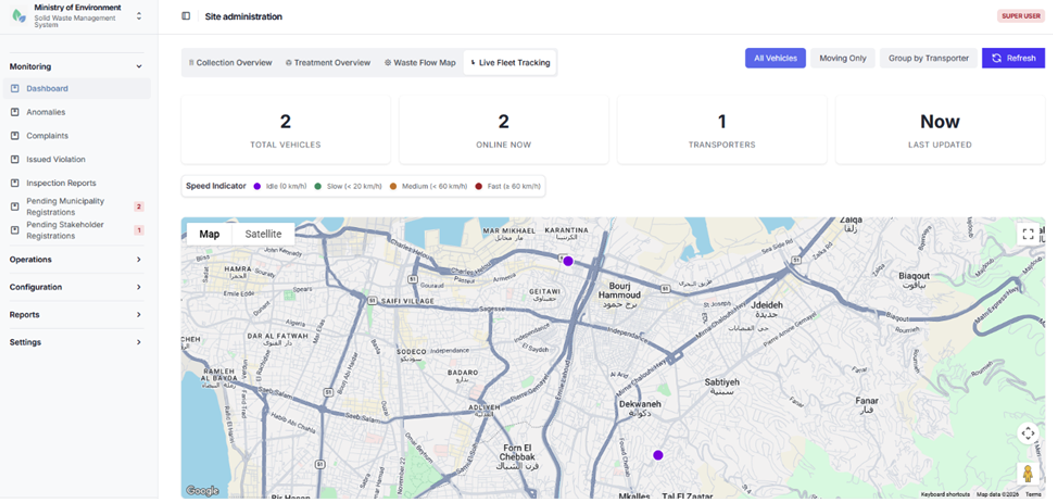
Live Fleet Tracking Dashboard
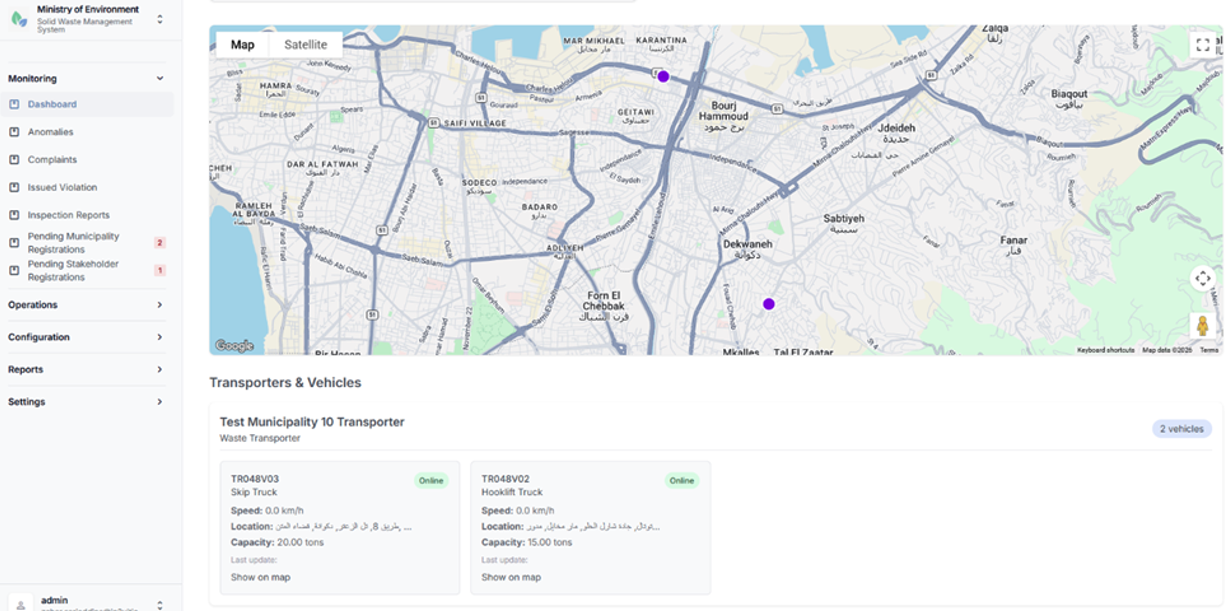
Live Fleet Tracking Dashboard
5.1.1.5 Dashboard Access Summary
The following table summarizes user access to the various dashboards within the SWMIS system, including applicable time filters and municipality-based data filtering.
| Dashboard | Available To | Time Filters | Municipality Filtering |
|---|---|---|---|
| Collection Overview | Ministry, Municipality roles | 7 / 30 / 90 / 180 / 365 days | Yes (auto-applied for municipal users) |
| Treatment Overview | Ministry, Municipality roles | 7 / 30 / 90 / 180 / 365 days | Yes |
| Waste Flow Map | Ministry, Municipality roles | 7 / 30 / 90 / 180 / 365 days | Yes |
| Live Fleet Tracking | Staff (Ministry, Municipality) | N/A (real-time) | By transporter |
5.1.2 Anomalies
The Anomalies module allows authorized users to monitor irregularities automatically detected within waste collection and transfer operations. The module helps regulatory authorities and operational staff identify potential compliance issues, operational inefficiencies, or data inconsistencies within submitted manifests.
An anomaly is generated when a collection or transfer manifest violates predefined operational thresholds or validation rules established within the SWMIS system.
Typical anomaly cases include:
- Overweight loads
Loads that exceed the permitted vehicle capacity or regulatory weight limits defined for transport operations.
- Underweight Loads
Loads that fall below expected operational thresholds, potentially indicating inefficient collection operations or incorrect data entry.
Detected anomalies are recorded by the SWMIS system and made available for review by authorized personnel, who can investigate the issue, validate the manifest data, and take appropriate corrective or administrative actions where necessary.
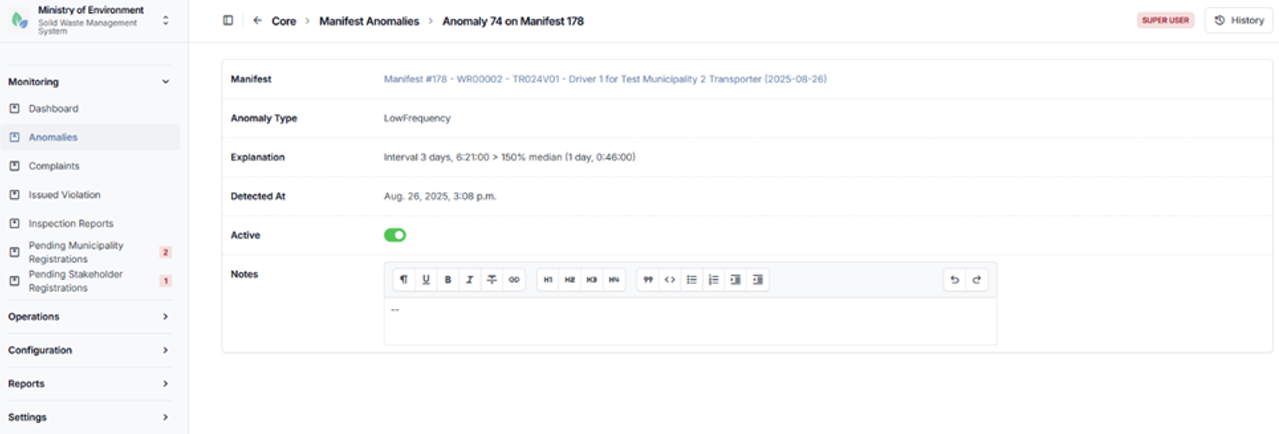
Anomalies Detail
5.1.3 Complaints
The Complaints module manages Environmental violations in waste management reports and public complaints submitted through the public reporting interface of the SWMIS platform.
Complaints are submitted by members of the public through the Complaints form and are automatically recorded in the system for review and follow-up by authorized administrative users.
This module enables authorities to monitor reported incidents, review submitted information, and coordinate appropriate response actions with relevant municipalities or waste management stakeholders.
Typical information included in a complaint report form may include:
- Location of the reported illegal dumping incident (Kaza, Municipality, GPS Coordinates)
- Description of the waste or issue reported
- Photos or supporting evidence (at least one file is required)
- Date and time of submission
- Status of the complaint (e.g., pending review, under investigation, resolved)
The module allows authorized users to track the status of complaints, update investigation outcomes, and ensure proper documentation of incident handling.
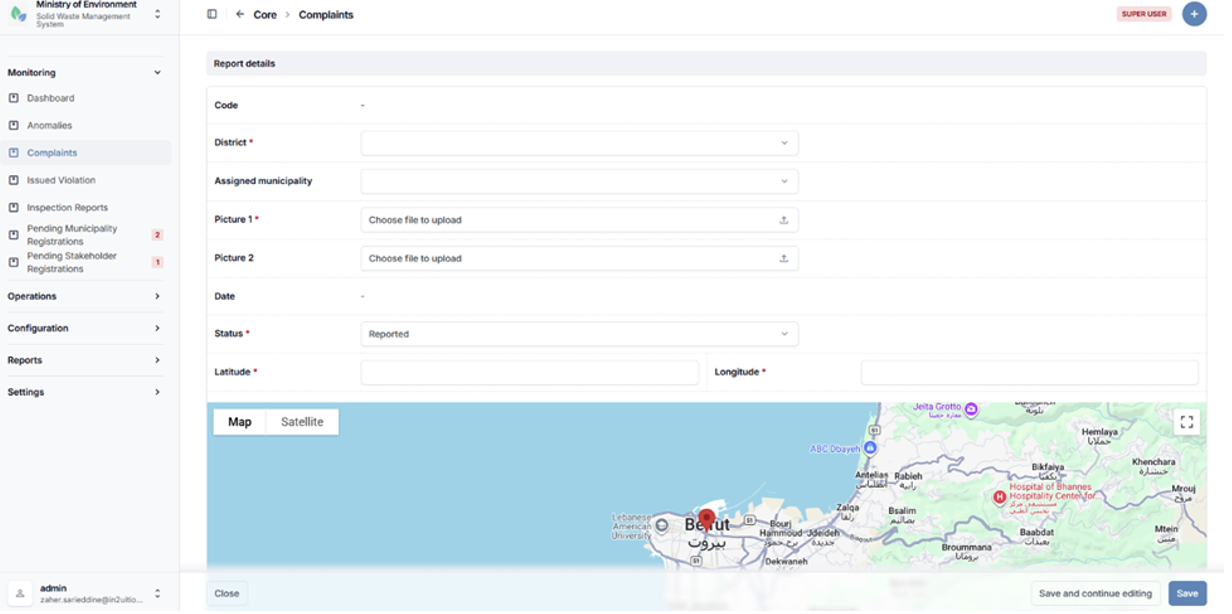
Complaints creation form
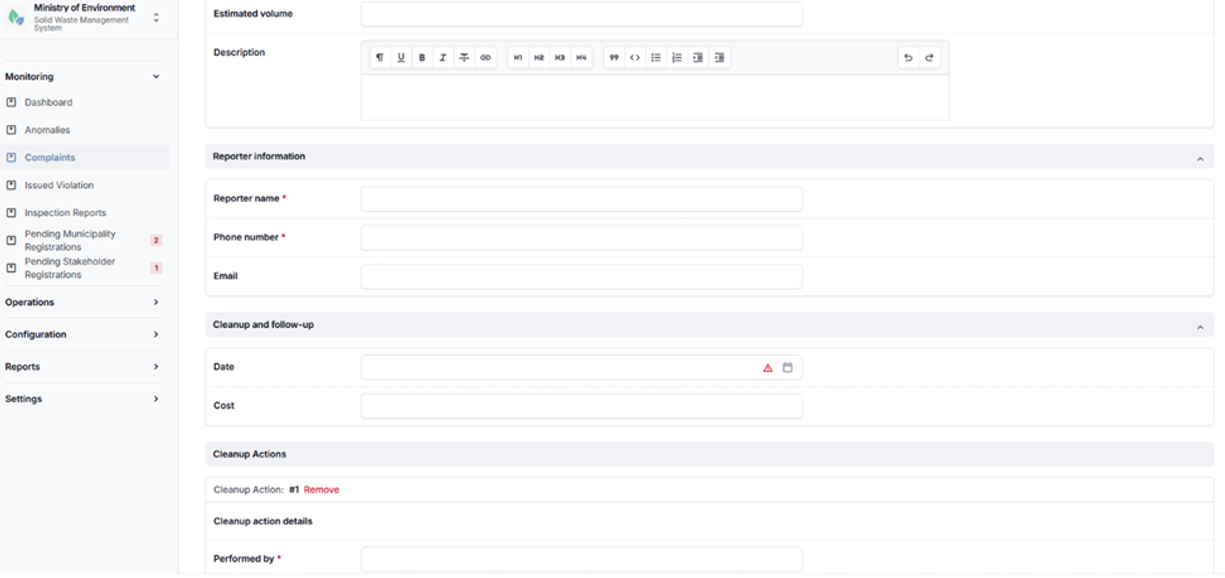
Complaints creation form
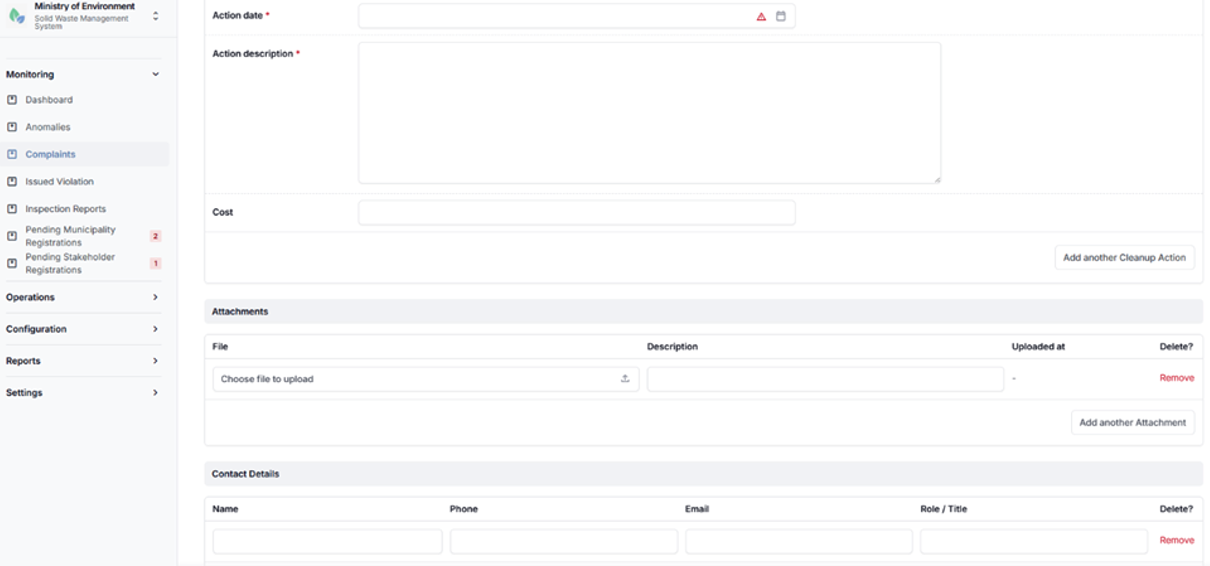
Complaints creation form
5.1.4 Issued Violation
The Issued Violations module allows authorized regulatory users to record and manage formal violations issued against stakeholders in cases of operational or environmental non-compliance.
Violations are typically issued when breaches are identified during system monitoring, anomaly detection, inspections, or complaint investigations.
This module supports regulatory enforcement by enabling authorities to document violations, track their status, and maintain a centralized record of non-compliance incidents.
Typical violation cases may include:
- Unauthorized waste disposal or illegal dumping
- Exceeding permitted waste handling or transport limits
- Failure to comply with reporting or documentation requirements
- Violations identified through anomalies or inspection findings
For each issued violation, the system records relevant details such as:
- Violating entity (e.g., generator, transporter, or facility)
- Description of the violation
- Date of issuance
- Supporting evidence or related reports
- Current status (e.g., issued, under review, resolved, escalated)
The module enables authorized users to monitor enforcement actions, follow up on violations, and ensure proper documentation and resolution in accordance with regulatory procedures.
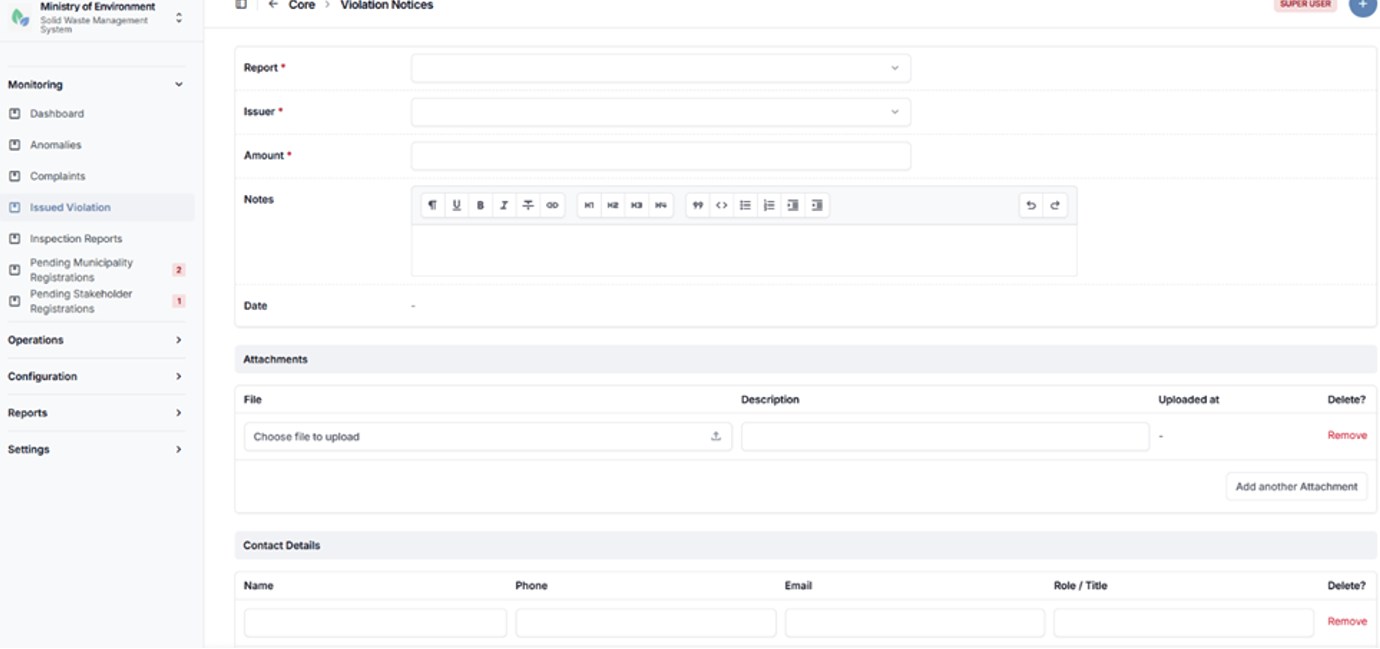
Issued violation creation form
5.1.5 Inspection Reports
The Inspection Reports module enables authorized users to document field inspections conducted on municipalities, waste transporters, generators, and waste management facilities.
Inspection reports provide structured and standardized documentation of compliance assessments, operational conditions, and regulatory observations recorded during site visits.
This module supports regulatory oversight by allowing inspectors to record findings, attach supporting evidence, and track inspection outcomes in a centralized system.
Key Features
- Inspection Report Creation
Authorized users can create detailed inspection reports by entering relevant information such as the inspected entity, inspection date, location, and purpose of the inspection. - Structured Data Entry
The system provides predefined fields and forms to ensure consistent reporting of inspection findings, observations, and compliance status. - Observations and Findings
Inspectors can document violations, risks, or non-compliance issues identified during the inspection. - Attachments and Evidence
Users can upload supporting documents, images, or other evidence related to the inspection. - Follow-up and Actions
Inspection reports can be used to trigger corrective actions, enforcement measures, or further investigations where required.
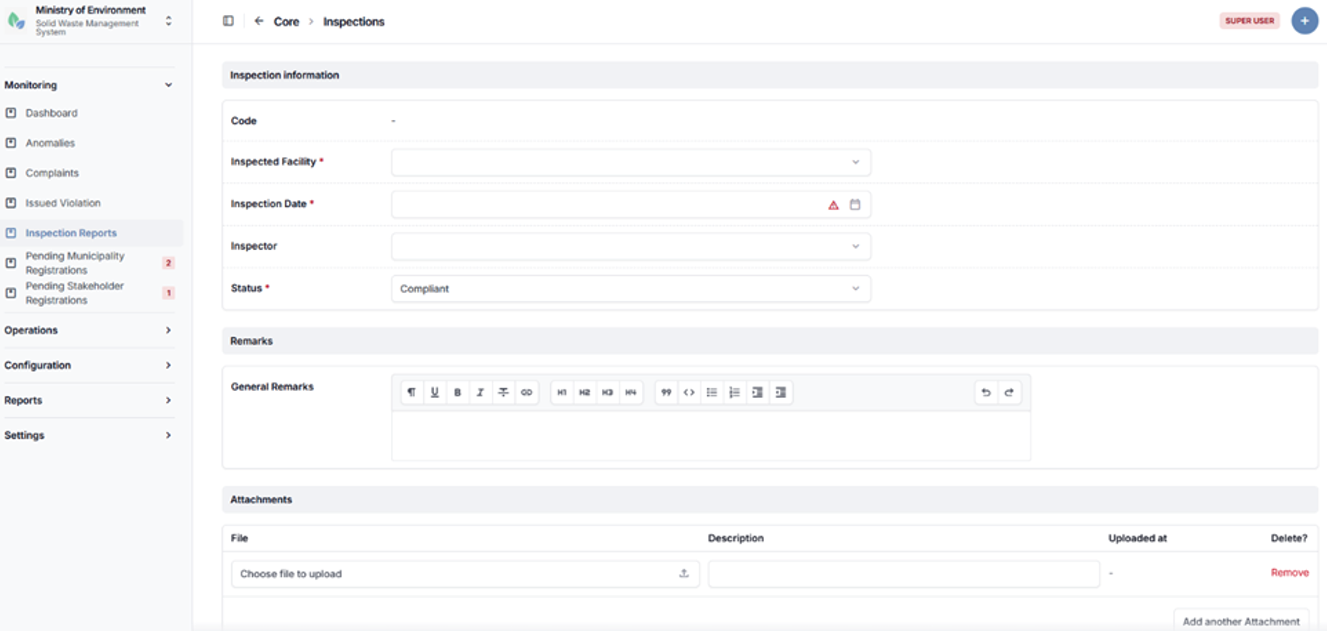
Inspection reports creation form
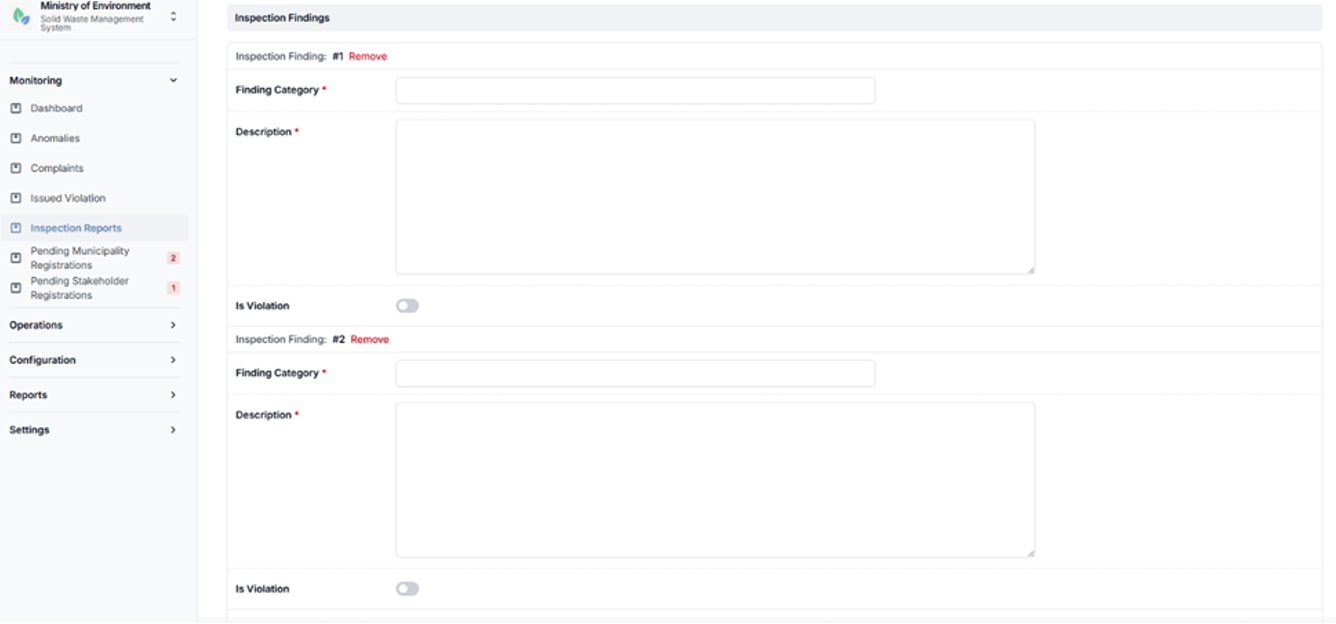
Inspection reports creation form
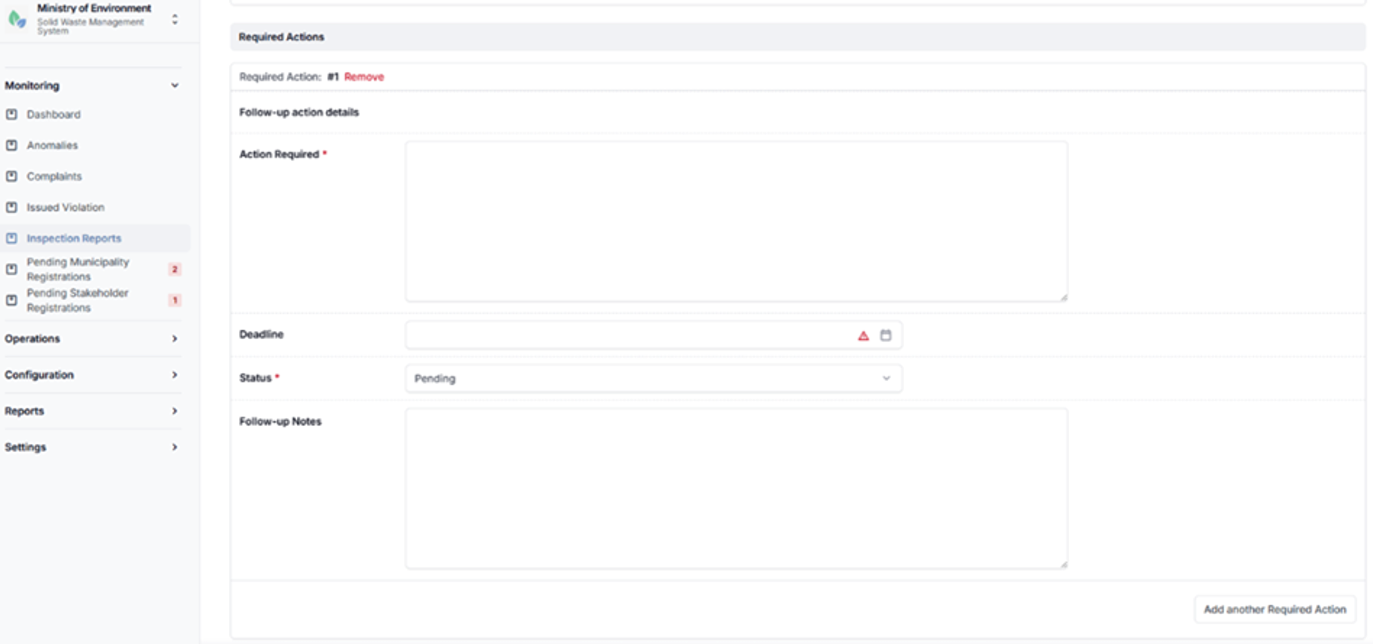
Inspection reports creation form
5.1.6 Pending Municipality Registrations
The Pending Municipality Registrations module allows municipalities to submit registration requests through the platform by providing the required administrative details and supporting documentation.
Once a registration request is submitted, it is recorded in the system and made available to authorized Ministry users for review and validation.
The Ministry reviews the submitted information to ensure completeness, accuracy, and compliance with registration requirements. Based on this evaluation, the Ministry has the authority to:
- Approve the registration, granting the municipality access to the system, or
- Reject the registration, with the option to request corrections or additional information.
This module ensures controlled onboarding of municipalities and supports proper verification before granting system access.
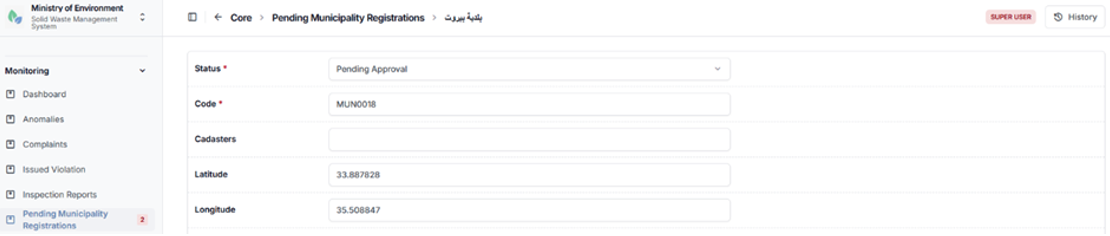
Pending municipality registration details
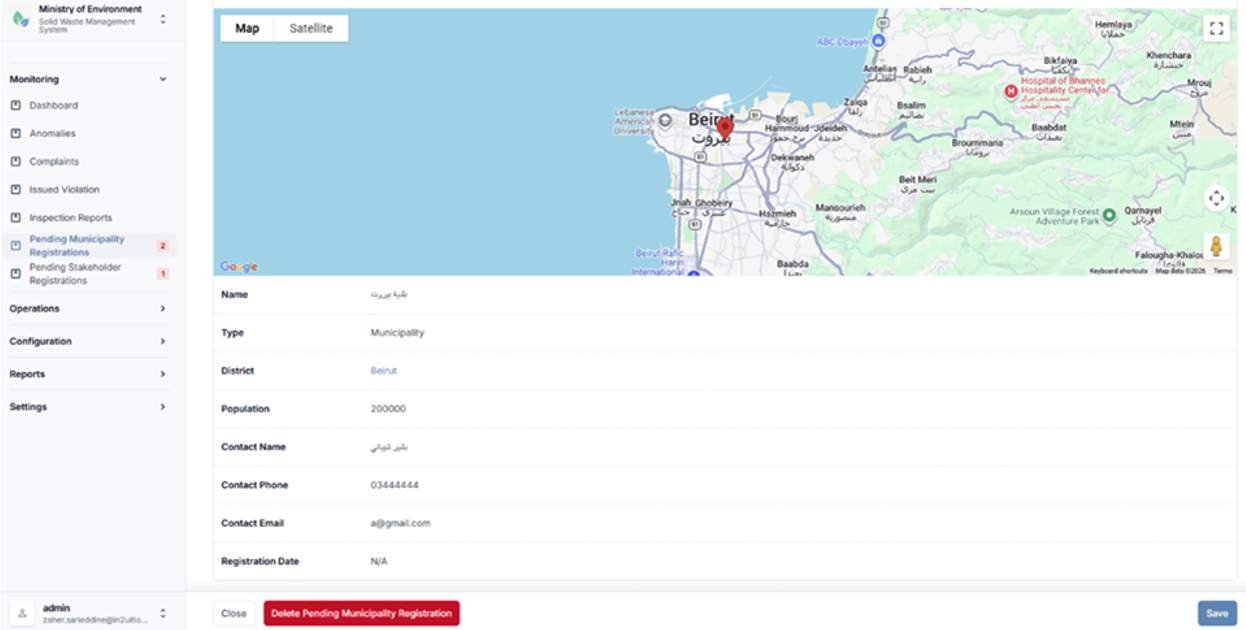
Pending municipality registration details
5.1.7 Pending Stakeholder Registrations
The Pending Stakeholder Registrations module allows external stakeholders to submit registration requests to access and operate within the system under one of the following categories:
- Waste Generator
- Waste Transporter
- Waste Management Facility
Upon submission, each registration request is recorded in the system and made available to authorized Ministry users for review and validation.
The Ministry evaluates the submitted information and supporting documentation to ensure compliance with regulatory and operational requirements. Based on this assessment, the Ministry has the authority to:
- Approve the registration, granting the stakeholder access to the system, or
- Reject the registration, with the option to request additional information or corrections.
This module ensures controlled onboarding of stakeholders and supports proper verification prior to granting system access and operational permissions.
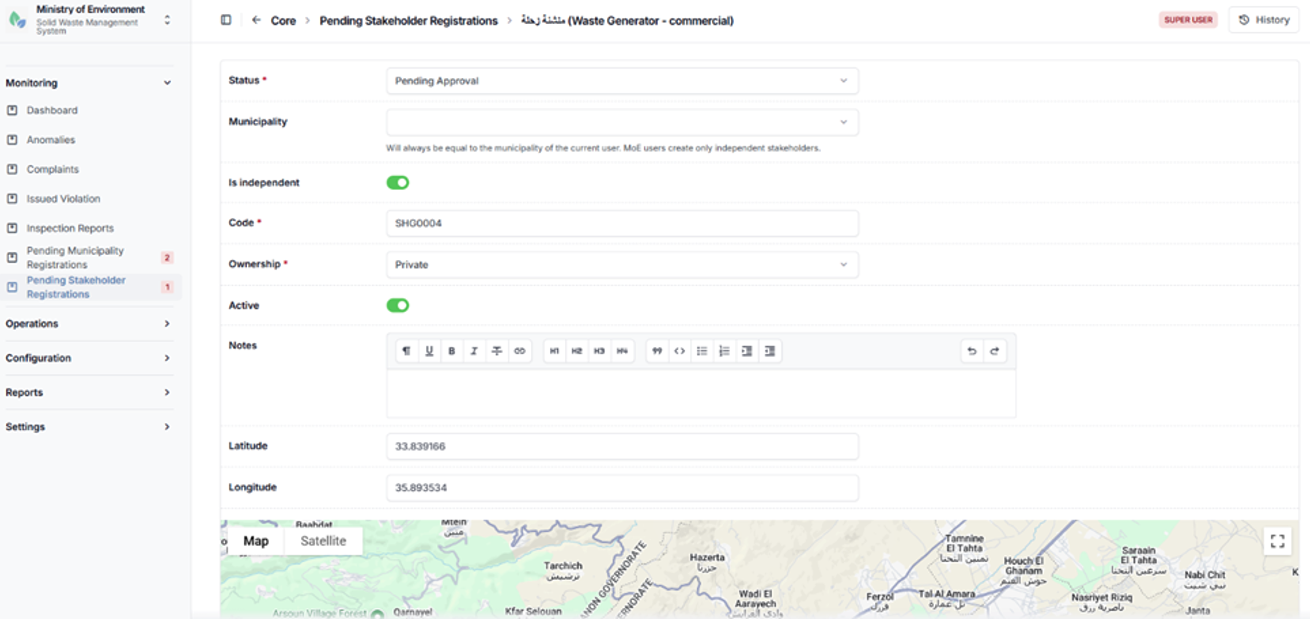
Pending stakeholder registration details
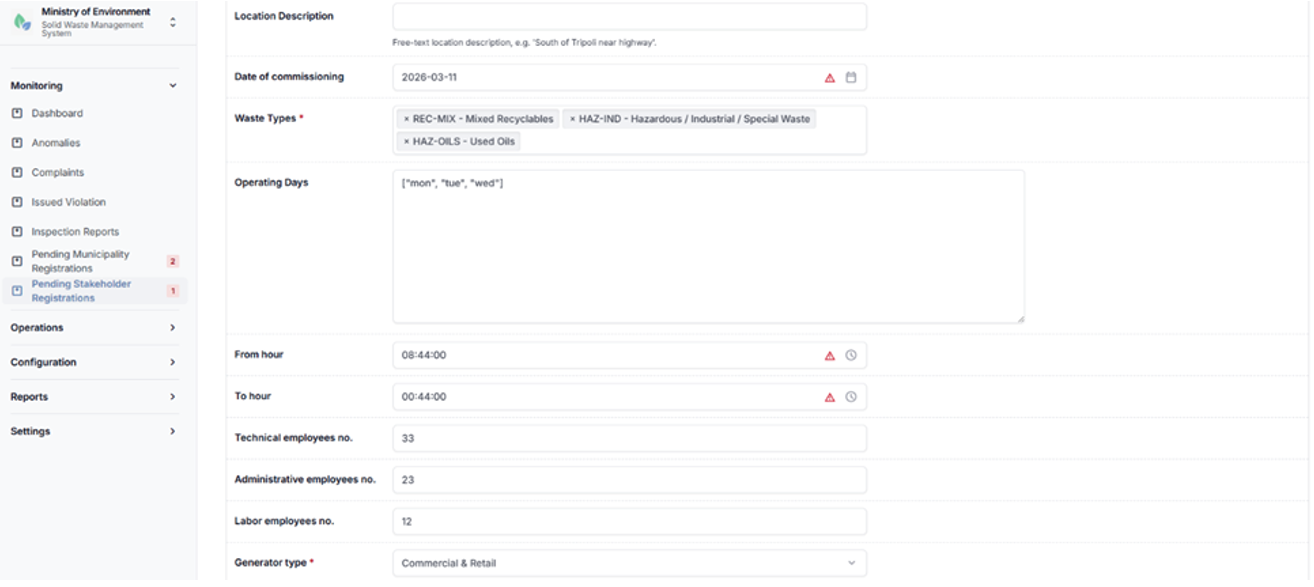
Pending stakeholder registration details
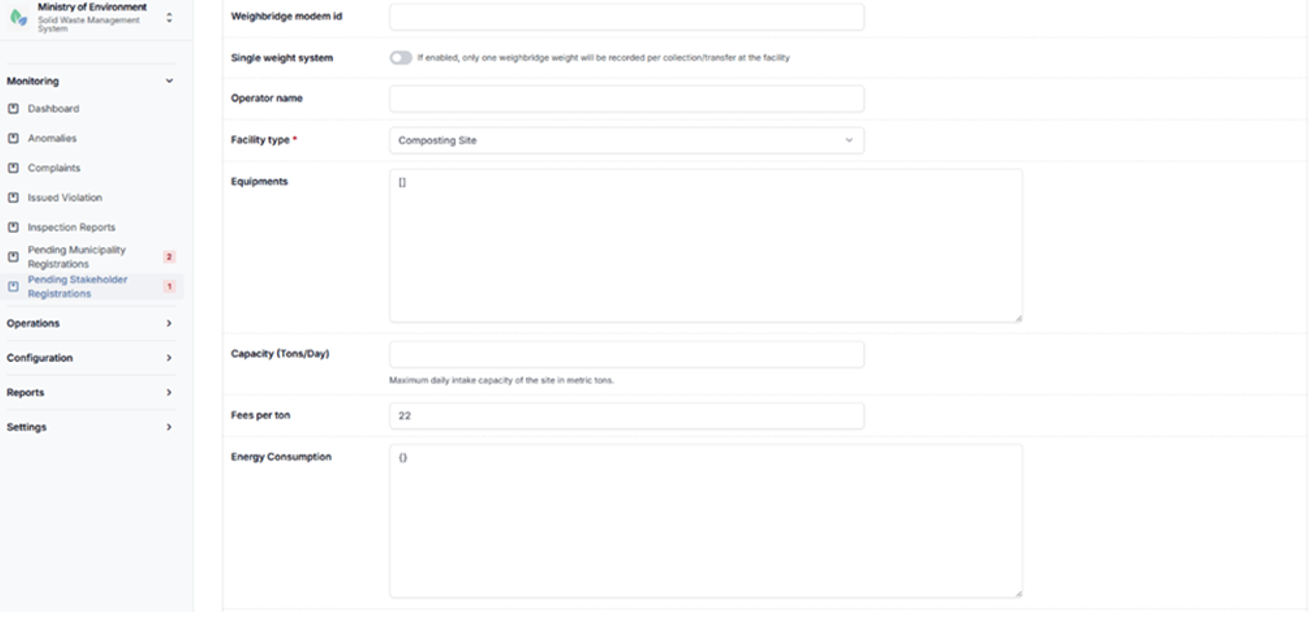
Pending stakeholder registration details
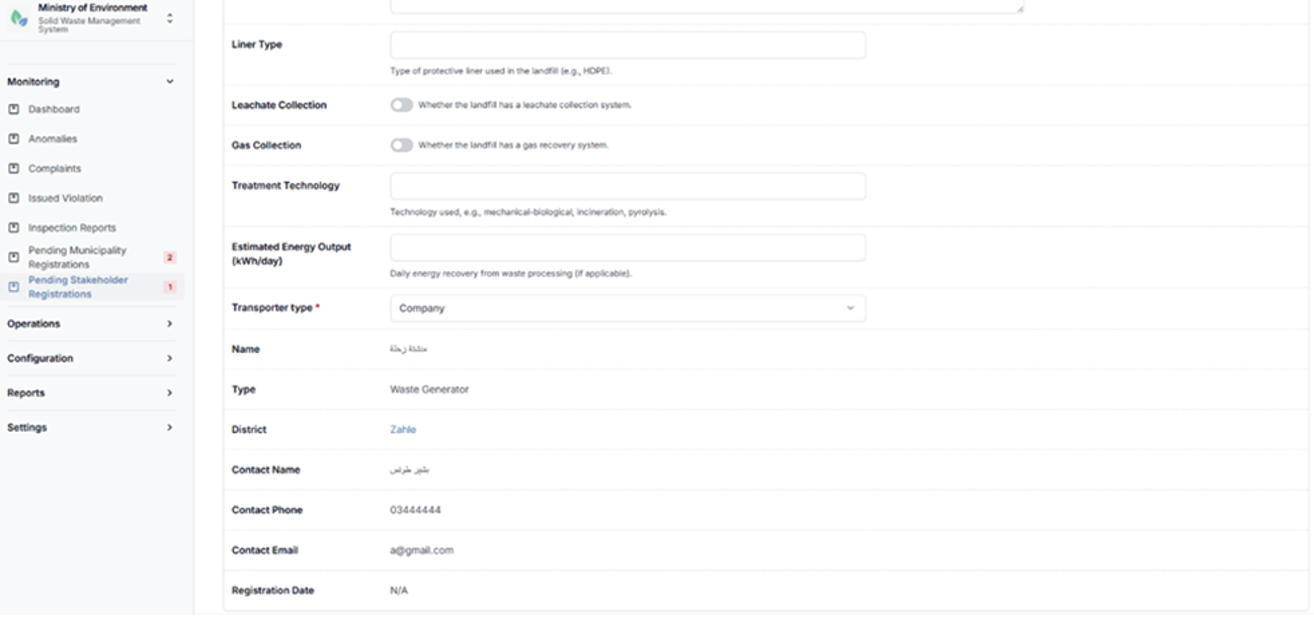
Pending stakeholder registration details
5.2 Configuration
The Configuration module enables authorized administrative users to manage the core operational entities of the Solid Waste Management Information System (SWMIS).
These entities define the structural components of the waste management chain and support the proper functioning of system operations. The module includes the management of the following elements:
- Municipalities
- Stakeholders (Waste Generators, Transporters, and Waste Management Facilities)
- Users
- Routes
- Vehicles
- Drivers
- Route Assignments
Access Control
Access to configuration features is governed by user roles to ensure appropriate levels of control and data security:
- Ministry Roles
Full access with national-level visibility and control across all entities. - Municipality Roles
Access limited to entities and data within their respective municipality. - Stakeholder Roles
Access restricted to their own organization and related operational data.
Adding a New Record
To create a new configuration record, follow these steps:
- Navigate to the relevant configuration section (e.g., Municipalities, Stakeholders, Users, Routes, Vehicles, Drivers, or Route Assignments).
- Click the “+” (Add New) button.
- Complete all required fields (marked with *).
- Enter any additional optional information as applicable.
- Click Save to create the record.
5.2.1 Municipalities
The Municipalities section allows authorized users to view, manage, and configure municipalities registered within the system.
This section enables users to maintain municipality records, update relevant information, and ensure proper administrative structuring within the platform.
Steps to Access Municipalities
- Log in using authorized system credentials.
- Navigate to الإعدادات (Configuration).
- Select البلديات (Municipalities).
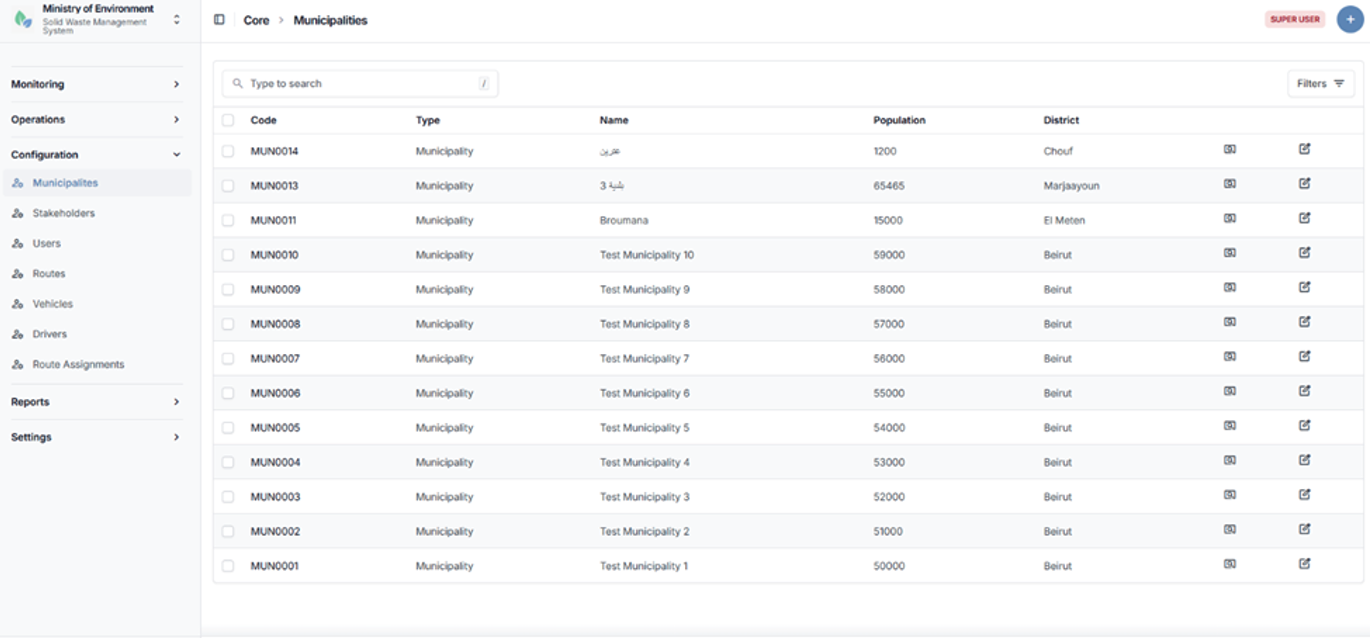
Municipalities list screen
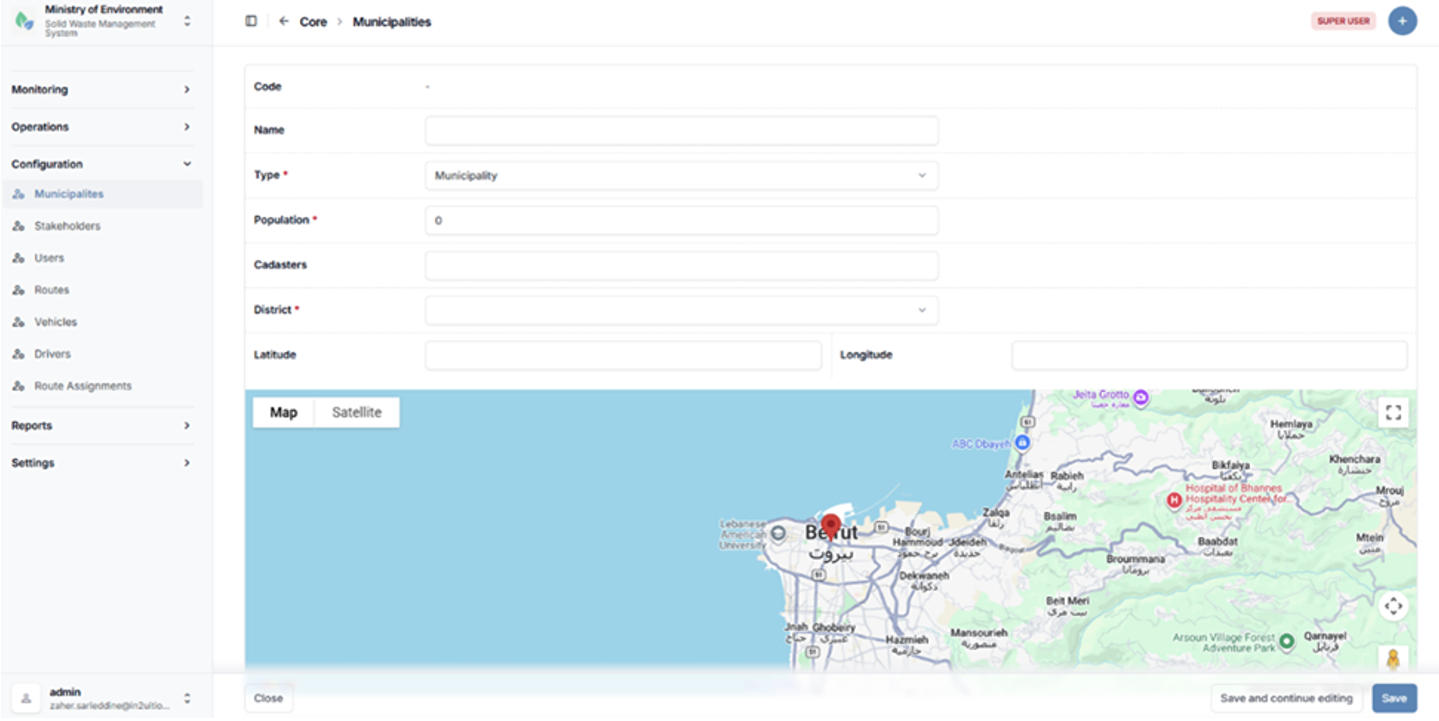
Municipality configuration form
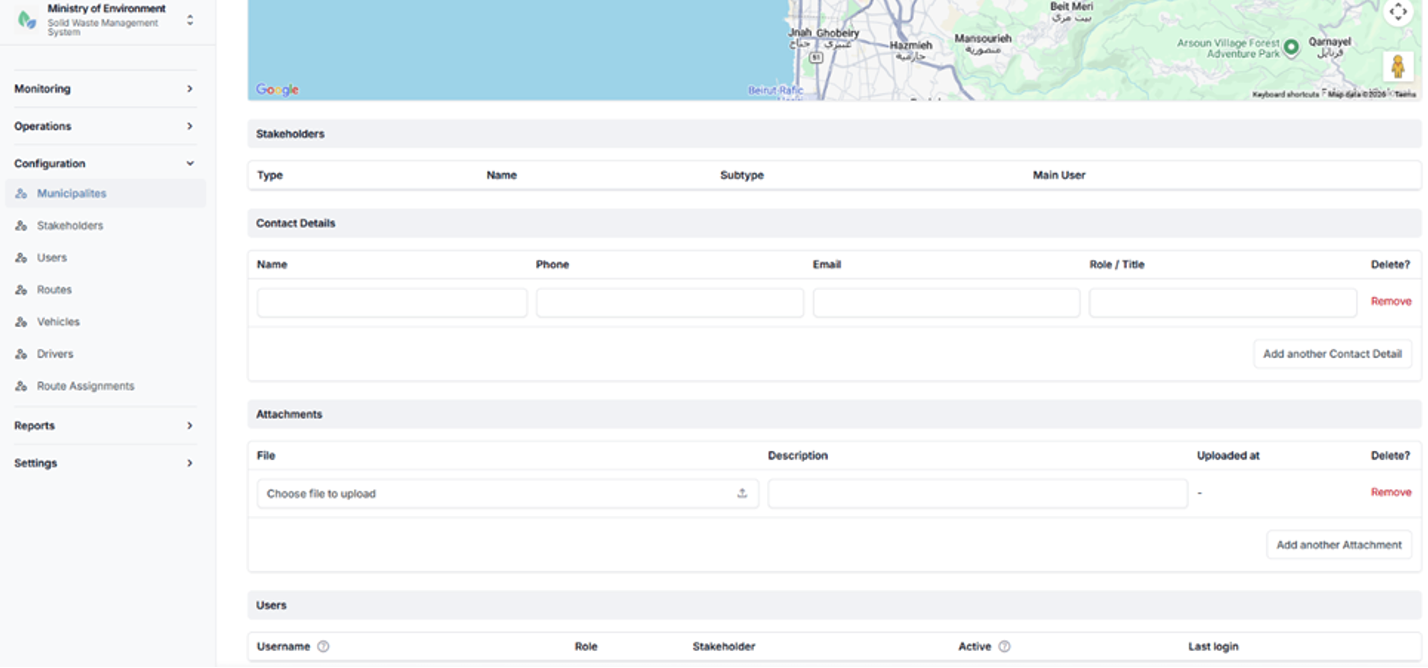
Municipality configuration form
5.2.2 Stakeholders
The Stakeholders section manages all operational entities involved in the waste management chain within the system.
Stakeholders are categorized based on their role in the waste lifecycle and are associated with specific municipalities and operational responsibilities.
Stakeholder Types
- Waste Generator
- Waste Transporter
- Waste Management Facility
Each stakeholder is linked to a municipality and assigned a defined operational role within the system.
Steps to Access Stakeholders
- Navigate to الإعدادات (Configuration).
- Select أصحاب المصلحة (Stakeholders).
The system will display the list of registered stakeholders.
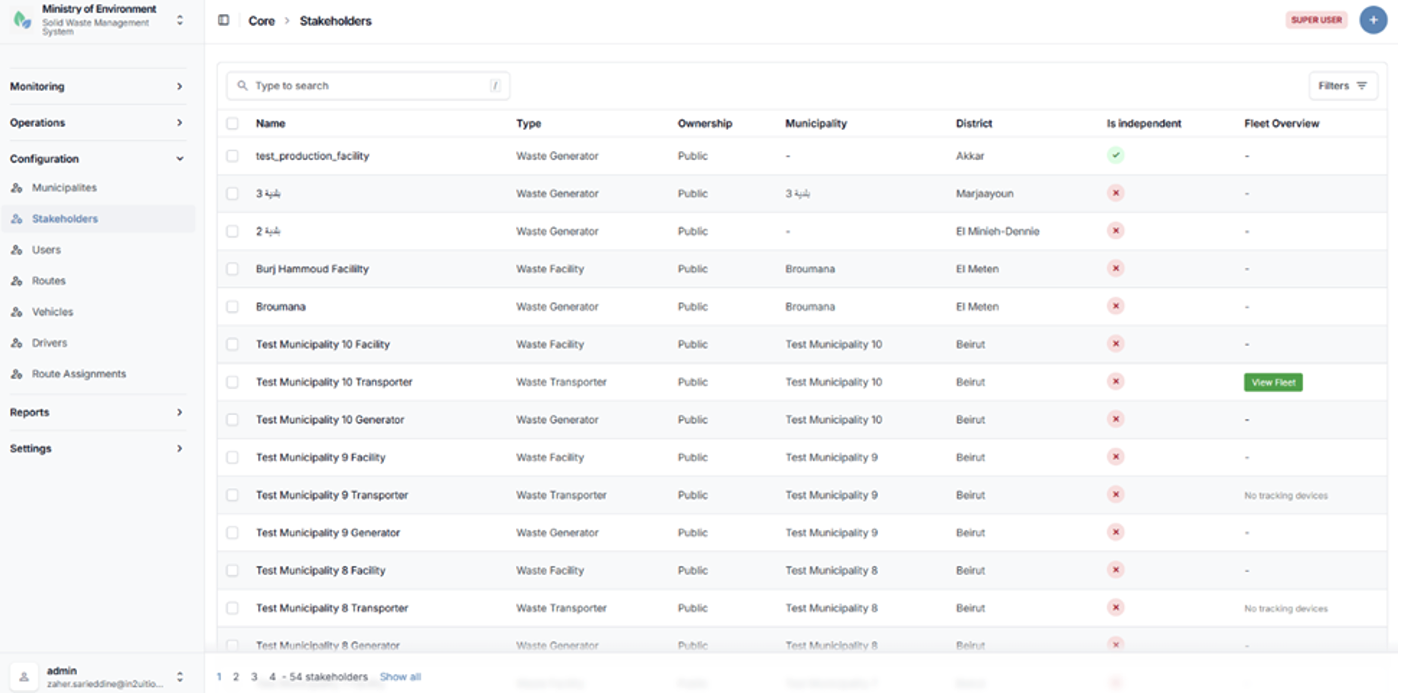
Stakeholders list (Generators, Transporters, Facilities)
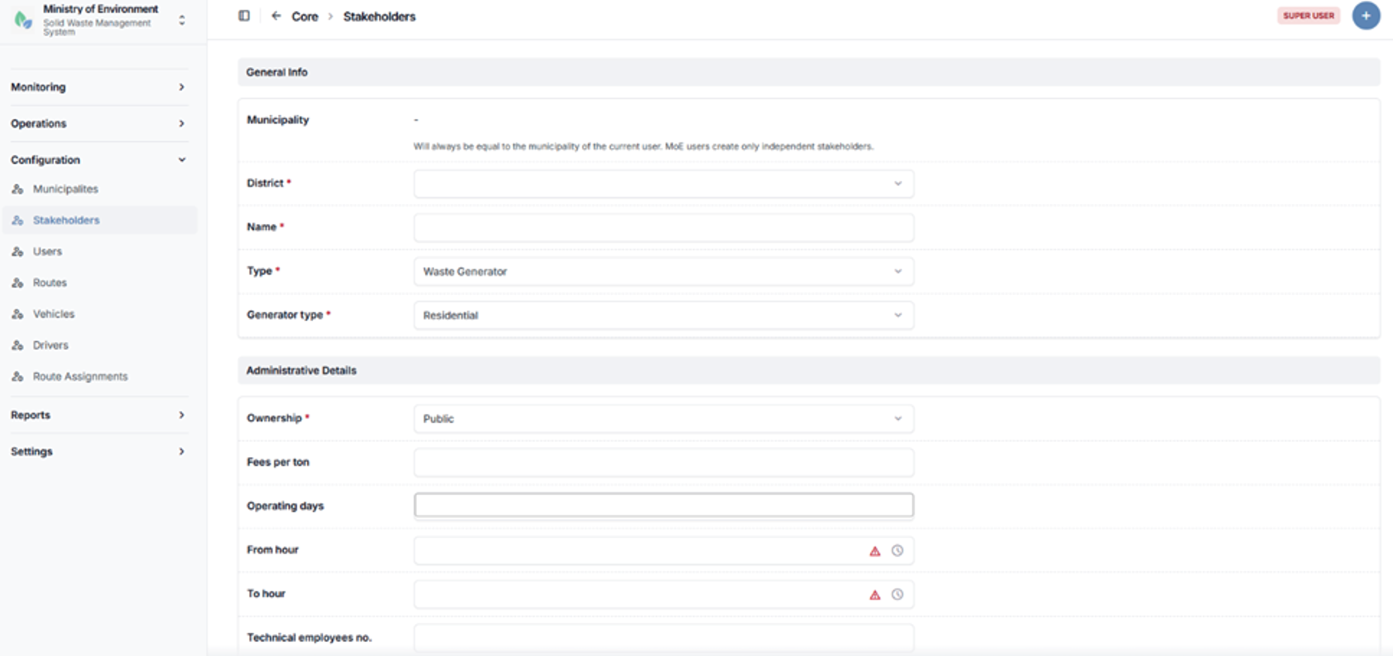
Stakeholder configuration form
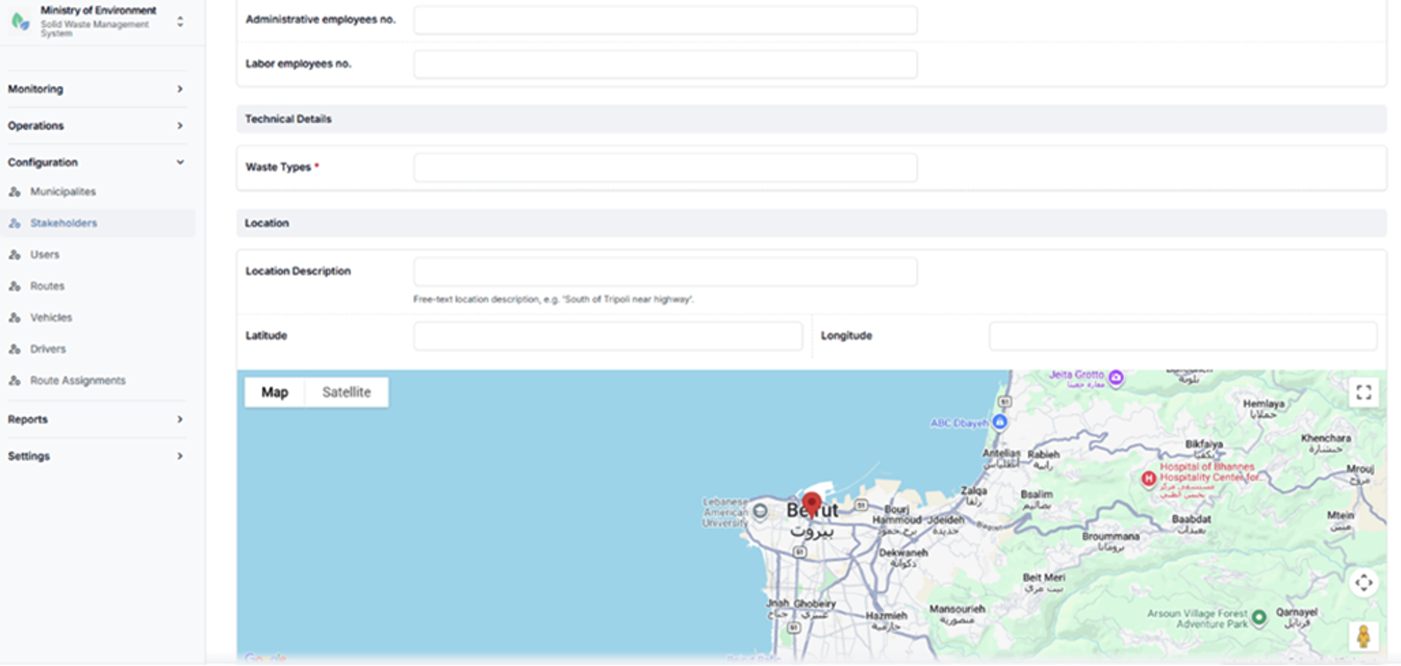
Stakeholder configuration form
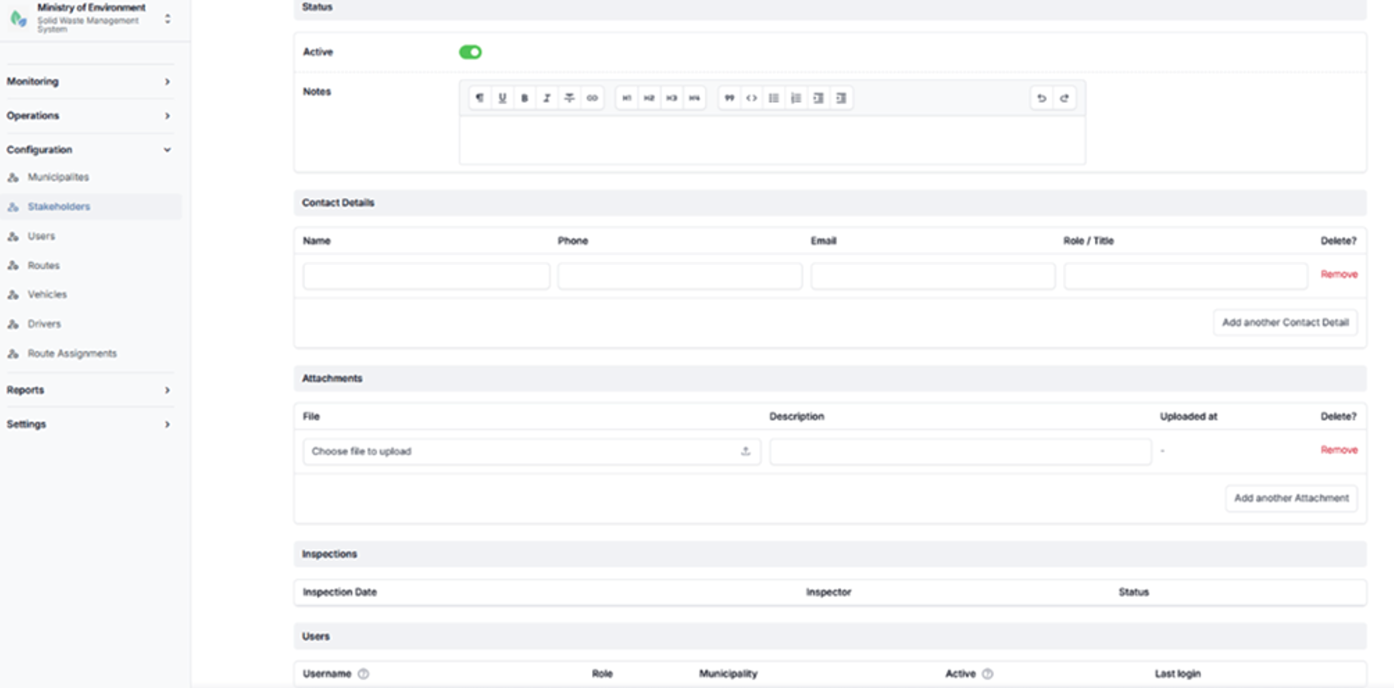
Stakeholder configuration form
5.2.3 Users
The Users section manages all system user accounts and their associated access rights within the platform.
Each user is configured with the following attributes:
- User Role
Defines the level of access and permissions within the system. - Affiliation
Assigned to a specific municipality or stakeholder entity, where applicable. - Access Permissions
Automatically determined based on the assigned role, ensuring appropriate access control and data security.
This section enables administrators to create, update, and manage user accounts in accordance with system roles and organizational structure.
Steps to Access Users
- Navigate to الإعدادات (Configuration).
- Select المستخدمين (Users).
The system will display the list of registered users.
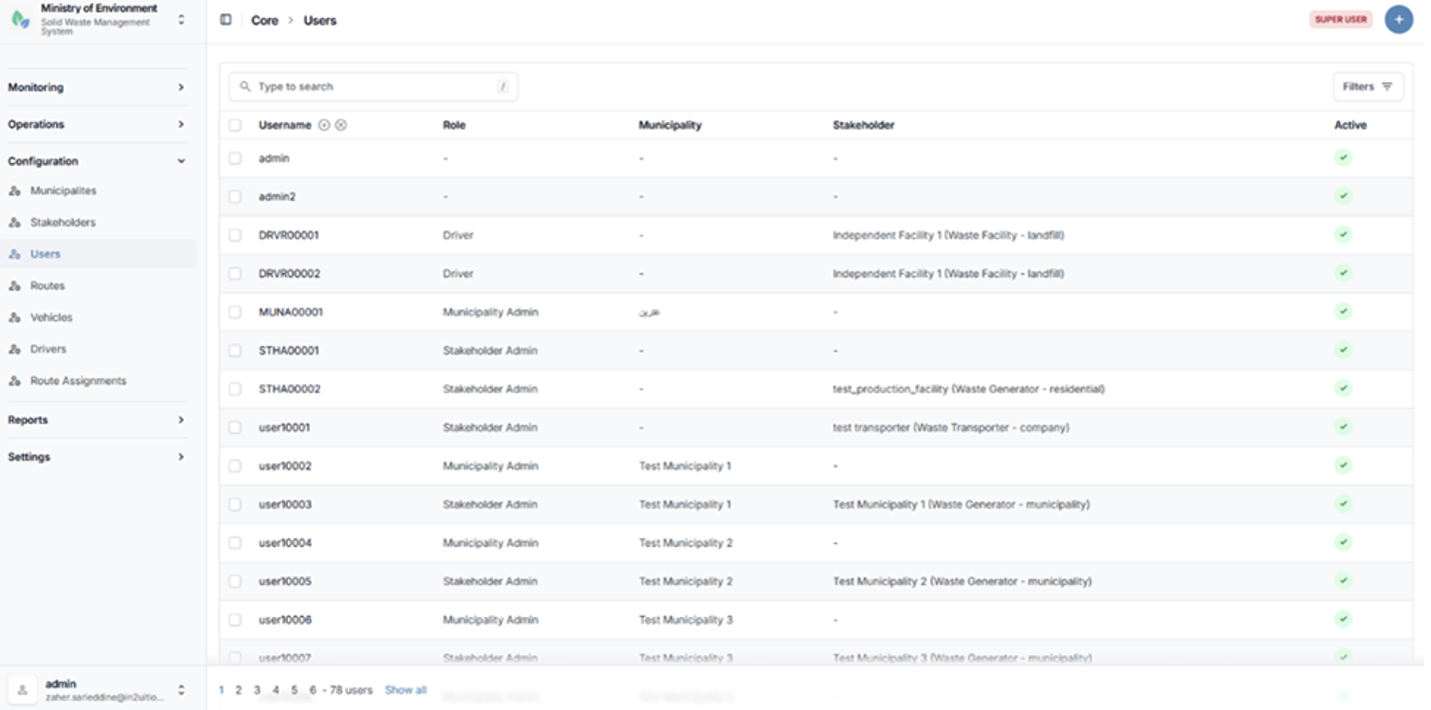
Users list page
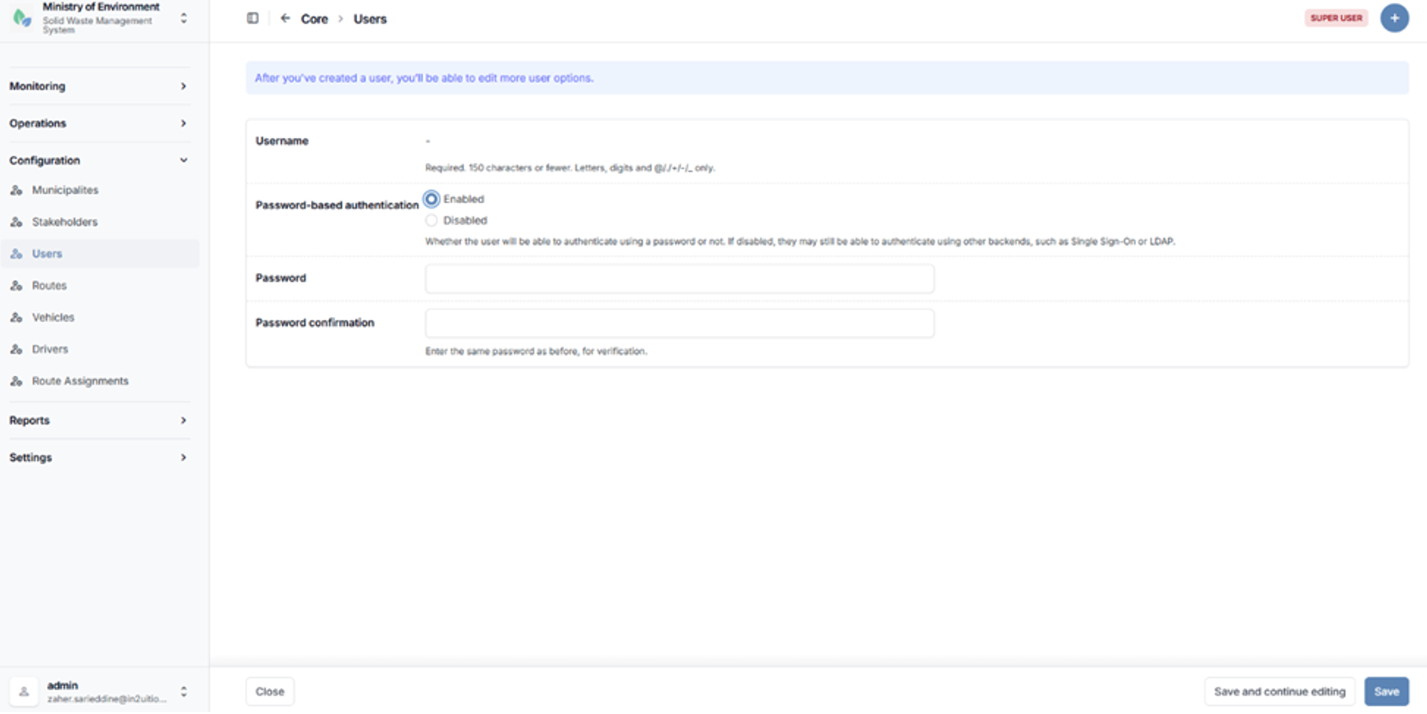
User creation form
After you've created a user, you’ll be able to edit more user options.
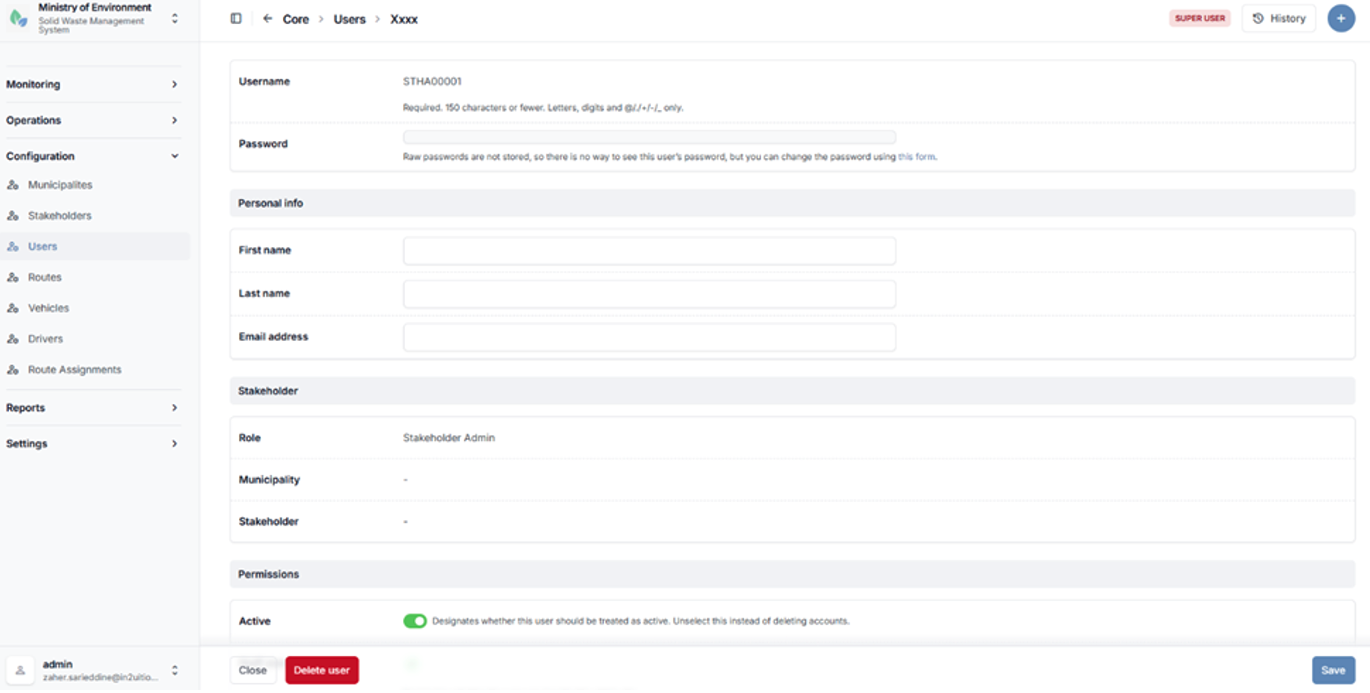
Additional user options
5.2.4 Routes
The Routes section defines and manages waste collection and transfer routes between waste generators and waste management facilities.
Routes represent the planned flow of waste within the system and are essential for organizing transport operations, monitoring movement, and ensuring proper coordination between stakeholders.
Each route typically includes the following components:
- Waste Generator
- Waste Management Facility
- Transporter
- Waste Type
- Expected Daily Quantity
This section enables administrators to configure and maintain route definitions to support operational planning and tracking of waste flows.
Steps to Access Routes
- Navigate to الإعدادات (Configuration).
- Select المسارات (Routes).
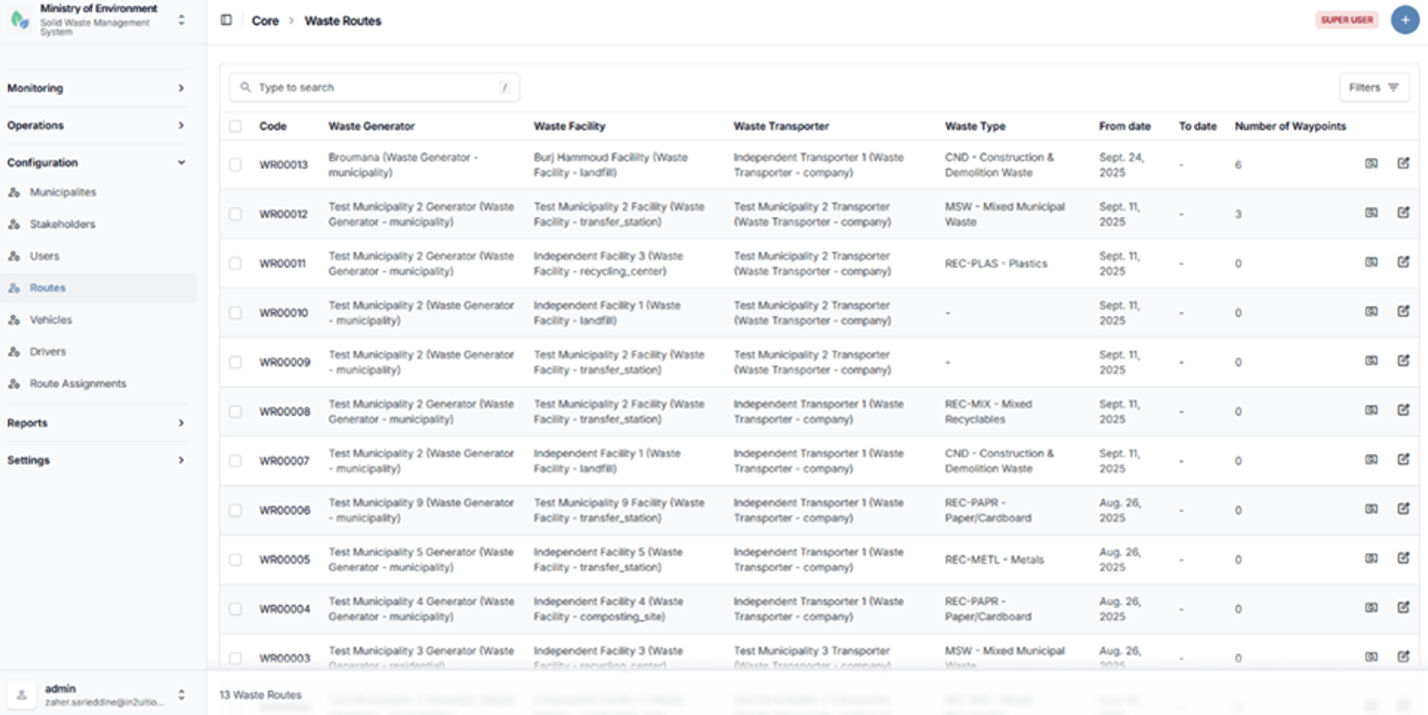
Routes list page
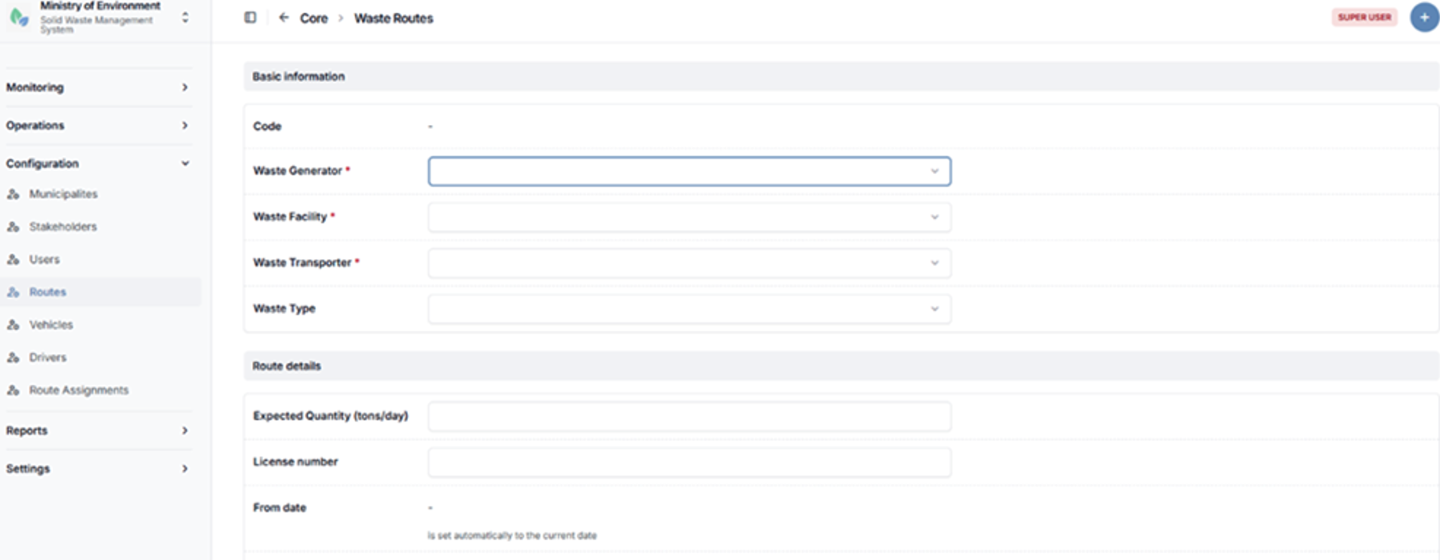
Route configuration form
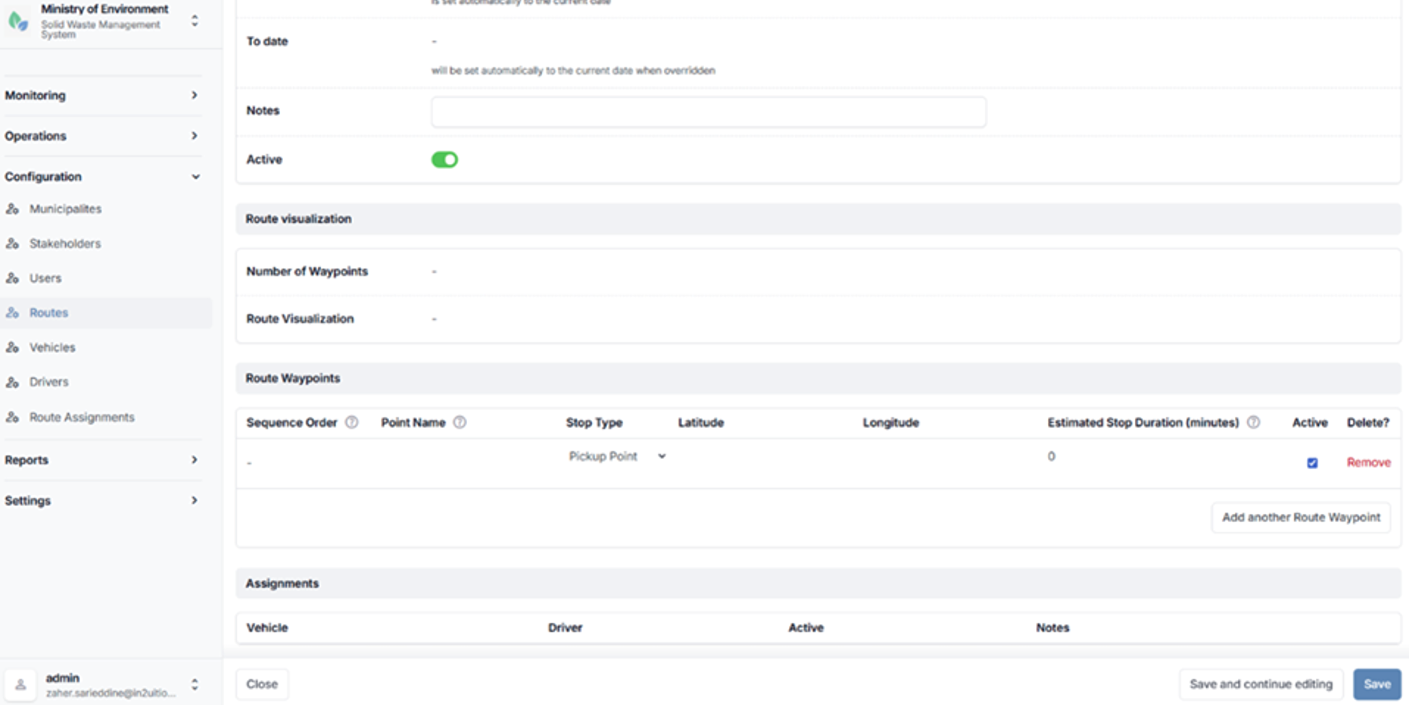
Route configuration form
5.2.5 Vehicles
The Vehicles section manages all waste transport vehicles registered within the system.
Each vehicle is associated with a Waste Transporter and is used in the execution of waste collection and transfer operations.
This section enables administrators to maintain accurate vehicle records, including operational and identification details.
Vehicles may include information such as vehicle code, license plate number, type, capacity, and associated tracking device (if applicable).
Steps to Access Vehicles
- Navigate to الإعدادات (Configuration).
- Select المركبات (Vehicles).
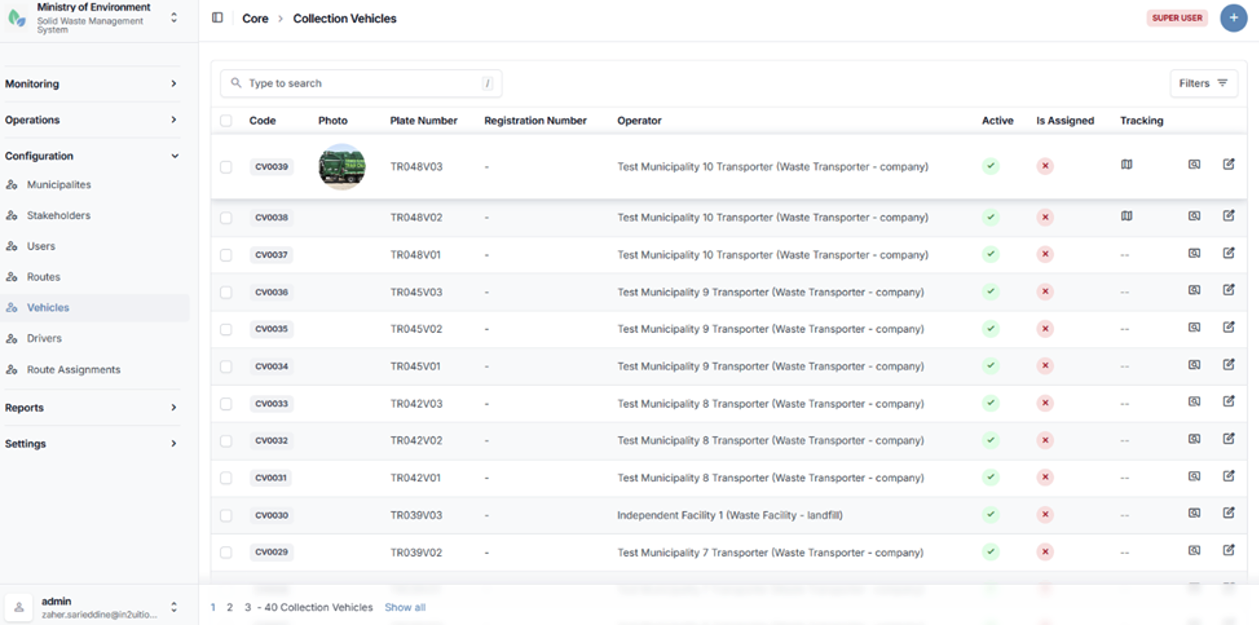
Vehicle configuration form
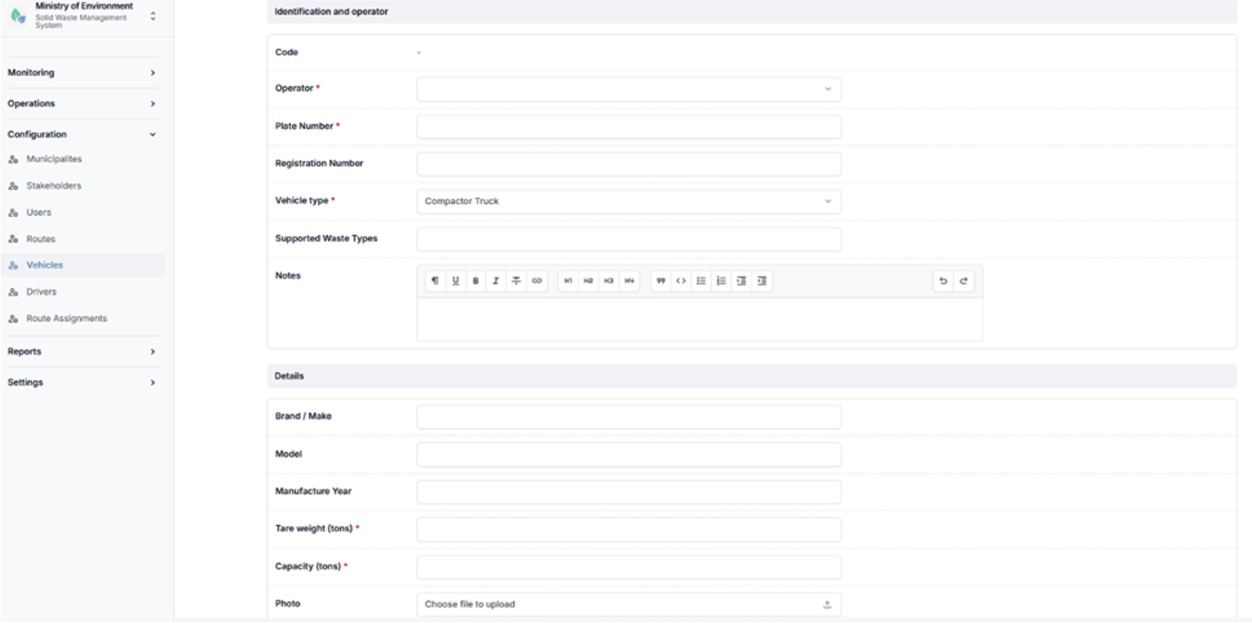
Vehicle configuration form
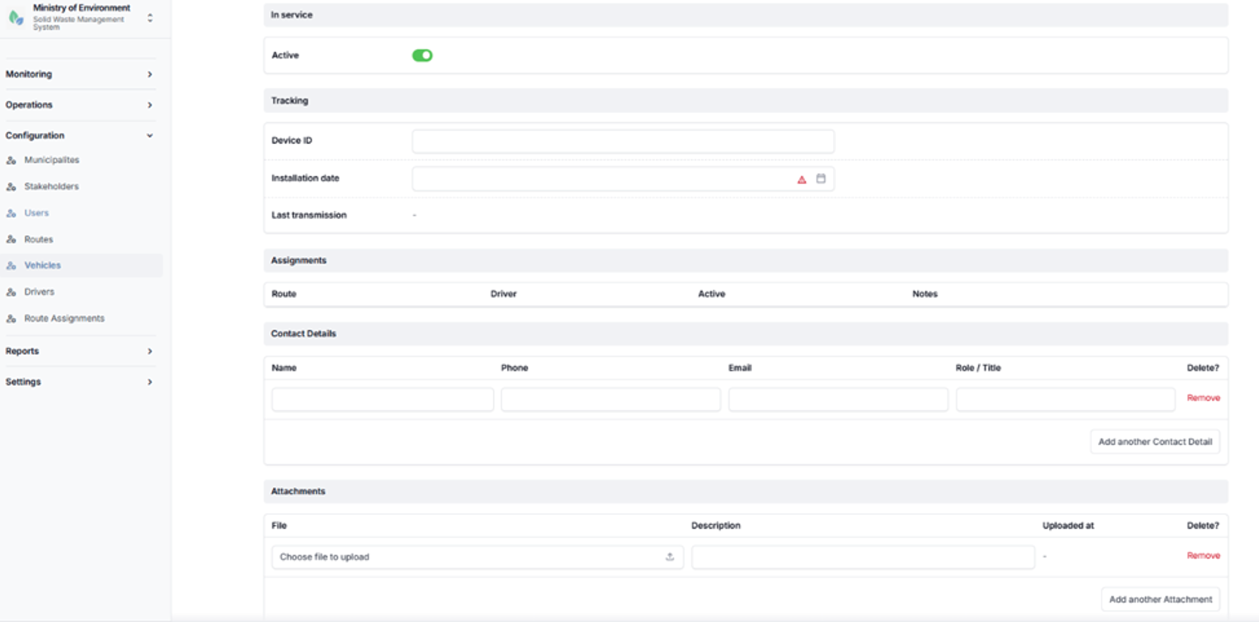
Vehicle configuration form
5.2.6 Drivers
The Drivers section manages all registered drivers operating waste collection and transfer vehicles within the system.
Each driver is associated with a Waste Transporter and plays a key role in executing collection and transport operations. This section enables administrators to maintain driver records and manage their operational assignments.
Each driver is:
- Linked to a Transporter
- Linked to a User Account
- Assigned to Vehicles and Routes
This ensures proper tracking of driver activities and alignment with assigned transport operations.
Steps to Access Drivers
- Navigate to الإعدادات (Configuration).
- Select السائقين (Drivers).
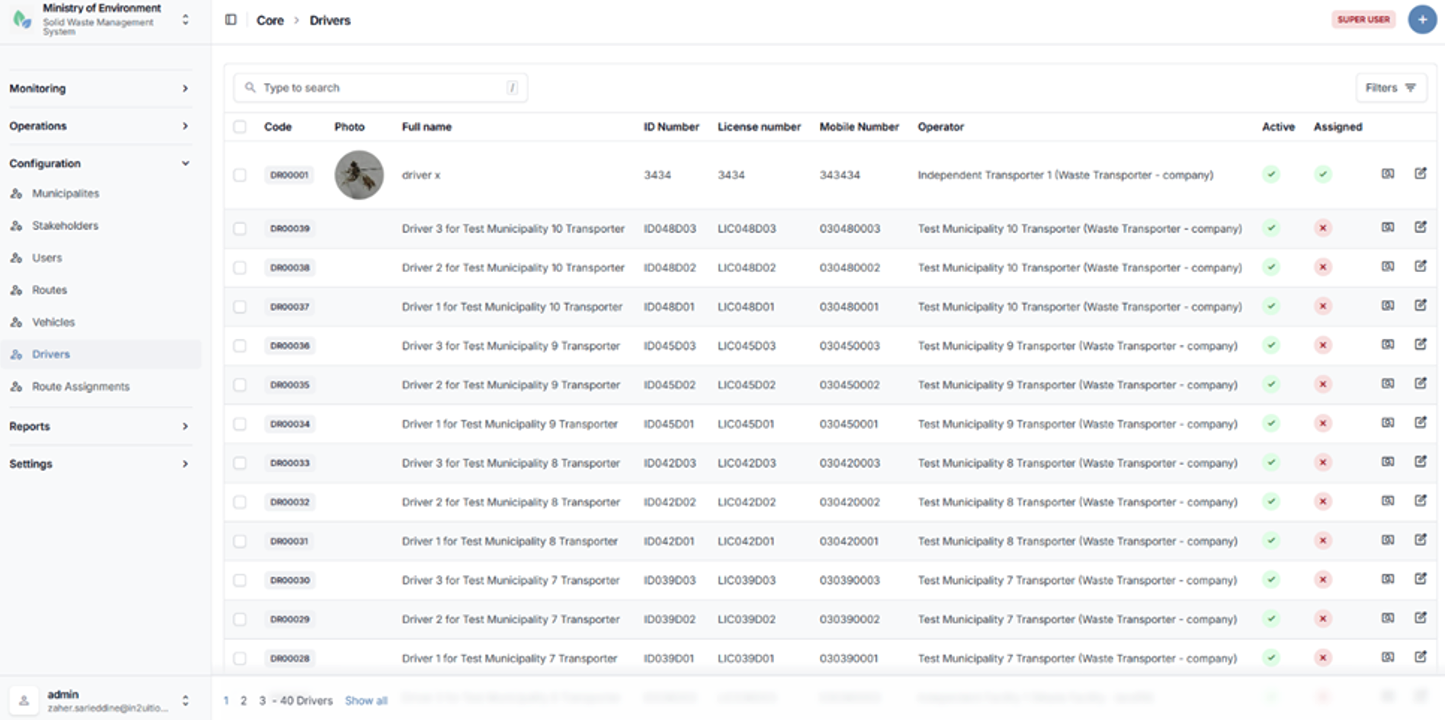
Drivers list page
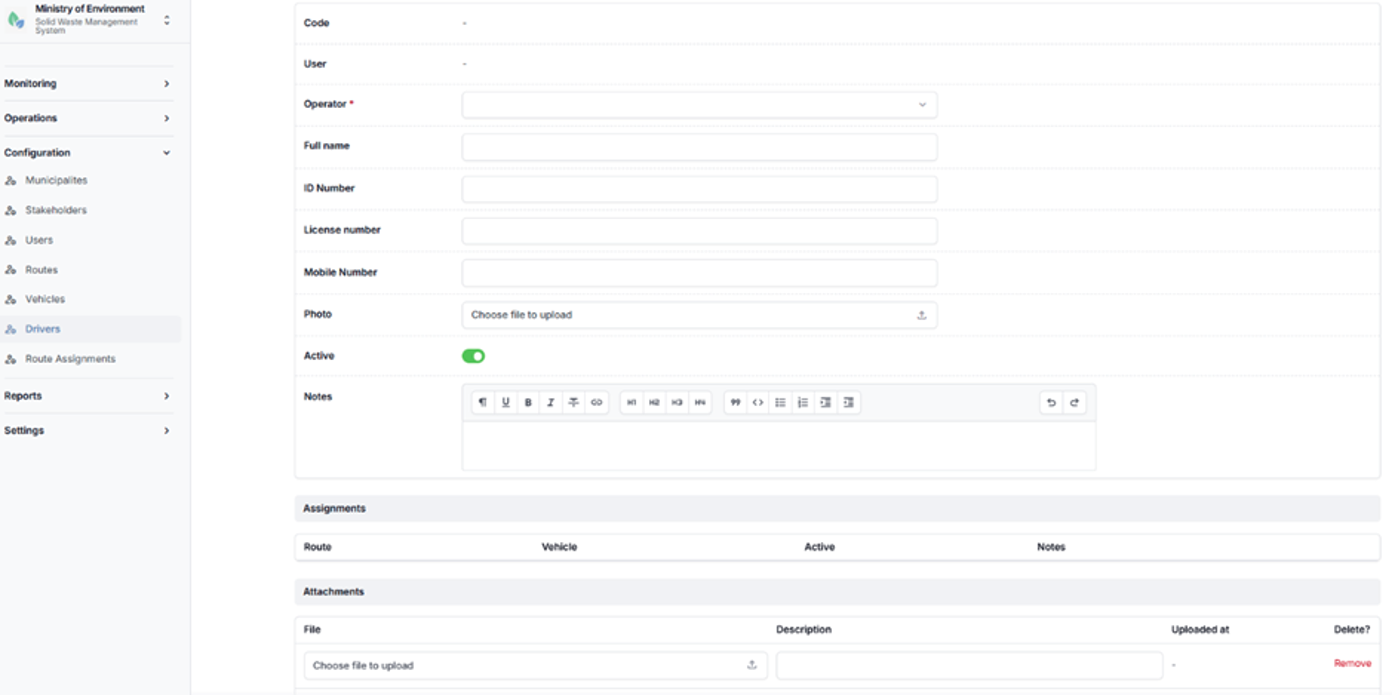
Driver configuration form
5.2.7 Route Assignments
The Route Assignments module defines and manages the operational linkage between routes, vehicles, and drivers.
This module establishes the execution framework for waste collection and transport operations by assigning specific resources to predefined routes.
Each route assignment links the following components:
- Route
- Vehicle
- Driver
These assignments define how waste collection activities are carried out in practice and support the coordination, scheduling, and tracking of daily operations.
The module ensures that each route is properly staffed and equipped, enabling efficient monitoring and management of waste transport activities.
Steps to Access Route Assignments
- Navigate to الإعدادات (Configuration).
- Select تعيين المسارات (Route Assignments).
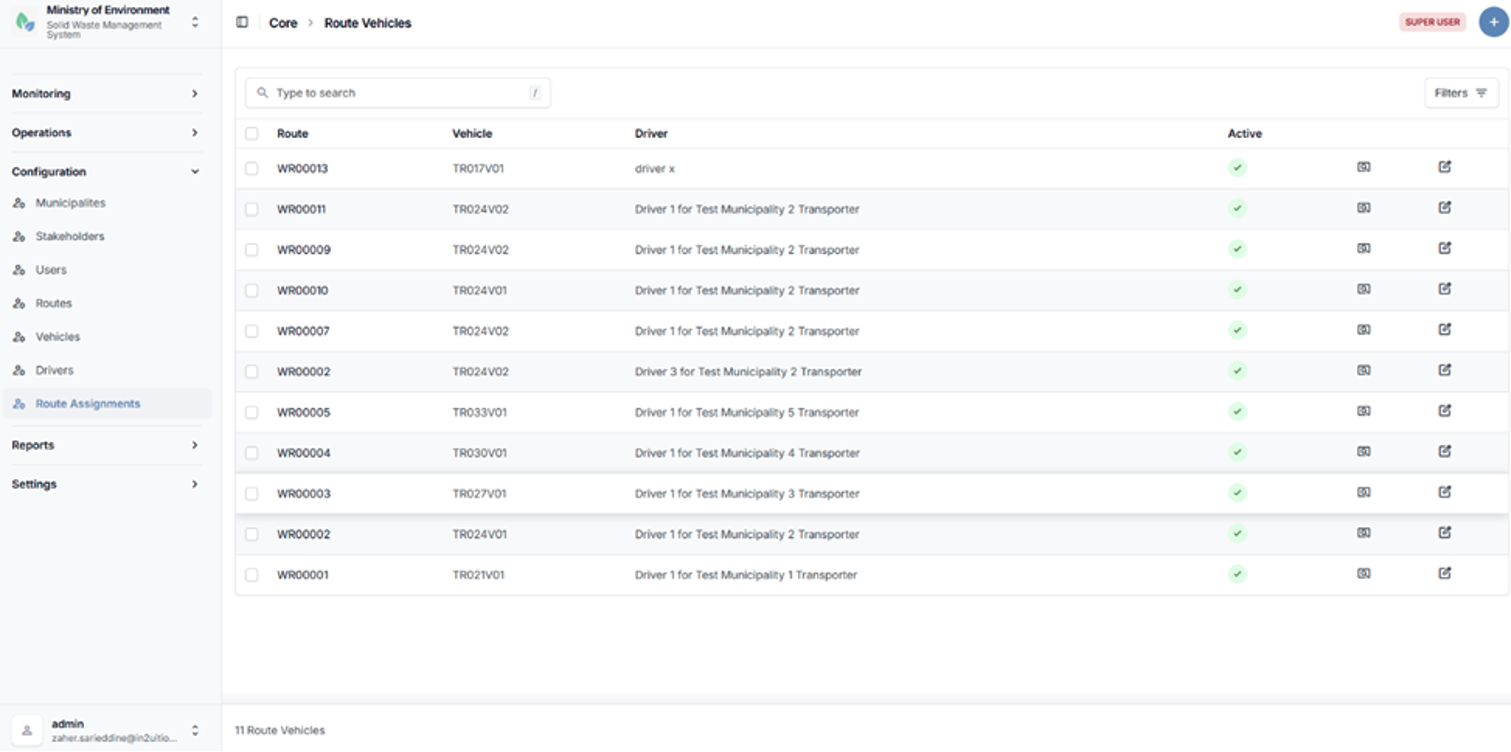
Route assignments list page
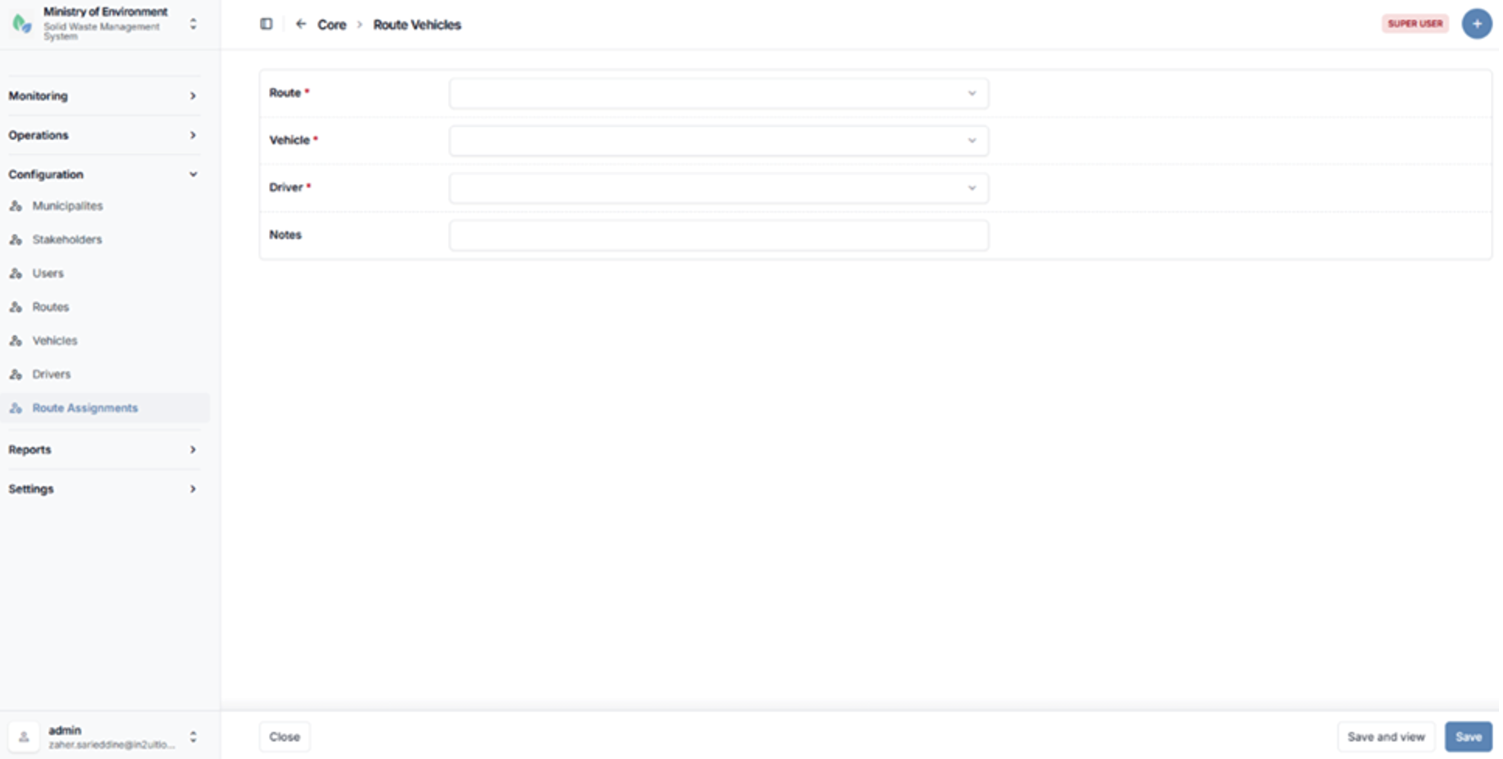
Route assignment configuration form
5.3 Reports
The Reports module provides a comprehensive set of reporting tools accessible through the administrative interface of the system. It enables users to generate, analyze, and export data related to waste management operations, compliance, and performance.
All reports are presented using a standardized layout that includes dynamic filtering options, structured tabular results, and export functionality.
Key Features
- Dynamic Filters
Users can apply filters such as date range, municipality, stakeholder, waste type, and other relevant parameters to refine report results. - Tabular Data Presentation
Report outputs are displayed in structured tables for clear data visualization and analysis. - Export Functionality
Reports can be exported in PDF format, allowing users to download and share official records.
Access Control
The Reports module is accessible to the following user roles:
- Ministry Roles (e.g., moe_admin, moe_user)
- Municipality Roles (e.g., municipality_admin)
- Stakeholder Roles (e.g., stakeholder_admin)
Access to report data is automatically restricted based on the user’s role and scope:
- Ministry users can access nationwide data.
- Municipality users can access data related only to their municipality.
- Stakeholder users can access data related only to their organization.
5.3.1 Stakeholder Operations Report (Waste Collection Report)
The Stakeholder Operations Report (Waste Collection Report) provides analytical insights into waste collection activities across the waste management chain. It enables users to evaluate operational performance through flexible filtering and grouping options.
Purpose
To analyze waste collection operations by comparing volumes, frequencies, and performance indicators across generators, transporters, facilities, and waste types over a selected period.
Parameters
| Parameter | Description | |
|---|---|---|
| Date Range | Select start date and end date for the reporting period. | |
| Waste Type | Filter results by a specific type of waste. | |
| Municipality | Filter data based on a selected municipality. | |
| Grouping | Group results by one or two levels: Waste Type, Generator, Transporter, or Facility. | |
Output Metrics
The report provides the following key indicators:
- Collections (Count) – Total number of collection operations recorded
- Total Weight (Tons) – Aggregate volume of collected waste
- Average Weight (Tons) – Average weight per collection operation
Use Case
This report is commonly used by Ministry analysts and decision-makers to compare collection performance across different stakeholders and identify trends in waste generation and transport activities over time.
Steps to Access the Report
- Navigate to تقارير (Reports).
- Select العمليات (Operations).
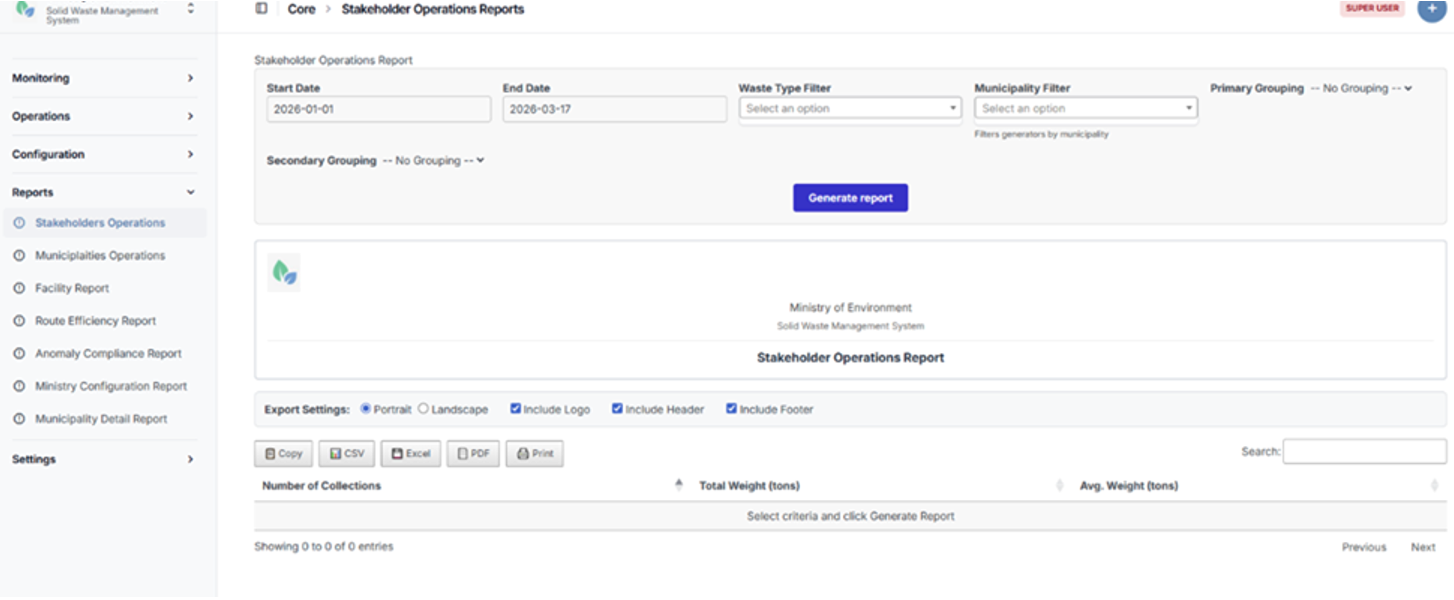
Stakeholder Operations Report page
5.3.2 Municipality Operations Report
The Municipality Operations Report provides a comparative analysis of waste collection performance across municipalities. It enables users to evaluate operational efficiency, resource utilization, and waste volumes at the municipal level.
Purpose
To assess and compare waste collection activities across municipalities, supporting performance monitoring and informed decision-making at the Ministry level.
Parameters
| Parameter | Description |
|---|---|
| Date Range | Select start date and end date for the reporting period. |
| Grouping | Optional grouping by Waste Type, Transporter, or Facility to provide more detailed analysis. |
Output Metrics
The report includes the following key indicators:
- Municipality – Name of the municipality
- Collections (Count) – Total number of collection operations
- Total Weight (Tons) – Aggregate volume of collected waste
- Average Weight (Tons) – Average weight per collection operation
- Average Trips per Day – Average number of collection trips per day within the selected period
Use Case
This report is primarily used by Ministry officials to monitor and compare municipal performance, identify inefficiencies, and support planning and resource allocation decisions.
Steps to Access the Report
- Navigate to تقارير (Reports).
- Select البلديات (Municipalities).
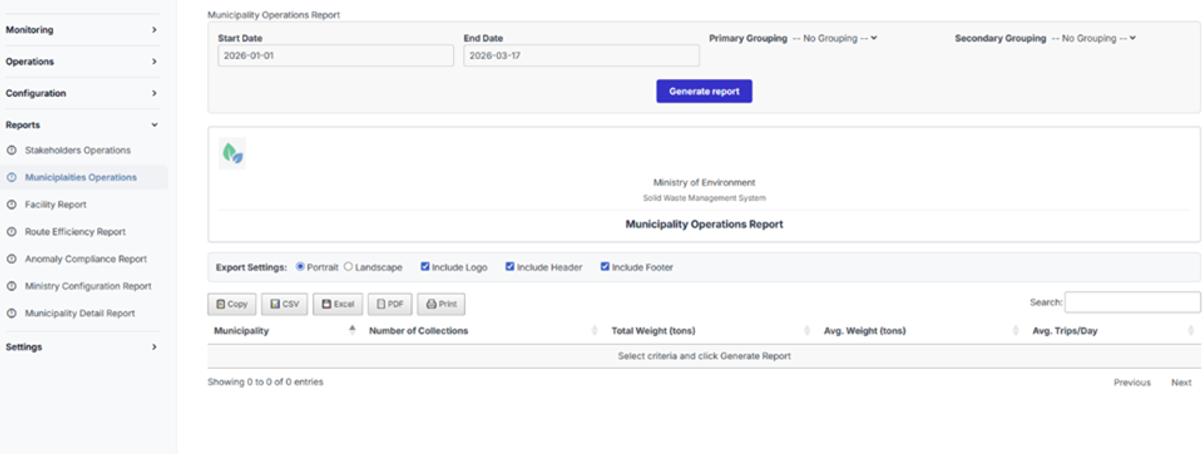
Municipality Operations Report page
5.3.3 Facility Capacity and Utilization Report
The Facility Capacity and Utilization Report provides detailed insights into the operational performance of waste management facilities. It enables users to monitor capacity usage, evaluate efficiency, and identify potential bottlenecks or overload risks.
Purpose
To assess facility performance by comparing actual waste intake against designed capacity, supporting operational planning and infrastructure optimization.
Parameters
| Parameter | Description |
|---|---|
| Date Range | Select start date and end date for the reporting period. |
| Specific Facility | Optional filter to analyze a single facility. |
| Show Monthly Trends | Option to include monthly trend analysis in the report output. |
Output Metrics
The report includes the following key indicators:
- Facility Name
- Facility Type
- Daily Capacity (Tons) – Designed operational capacity of the facility
- Total Received (Tons) – Total volume of waste received within the date range
- Average Daily Received (Tons) – Average daily intake of waste
- Utilization (%) – Percentage of capacity utilized
- Peak Day – Date with the highest recorded intake
- Peak Load (Tons) – Maximum volume received in a single day
- Monthly Trends (Optional) – Breakdown of waste received per month (if enabled)
Use Case
This report is used by facility managers and Ministry planners to evaluate whether facilities are operating within their designed capacity, identify inefficiencies, and anticipate potential overload conditions requiring operational or strategic intervention.
Steps to Access the Report
- Navigate to تقارير (Reports).
- Select منشآت النفايات (Waste Facilities).
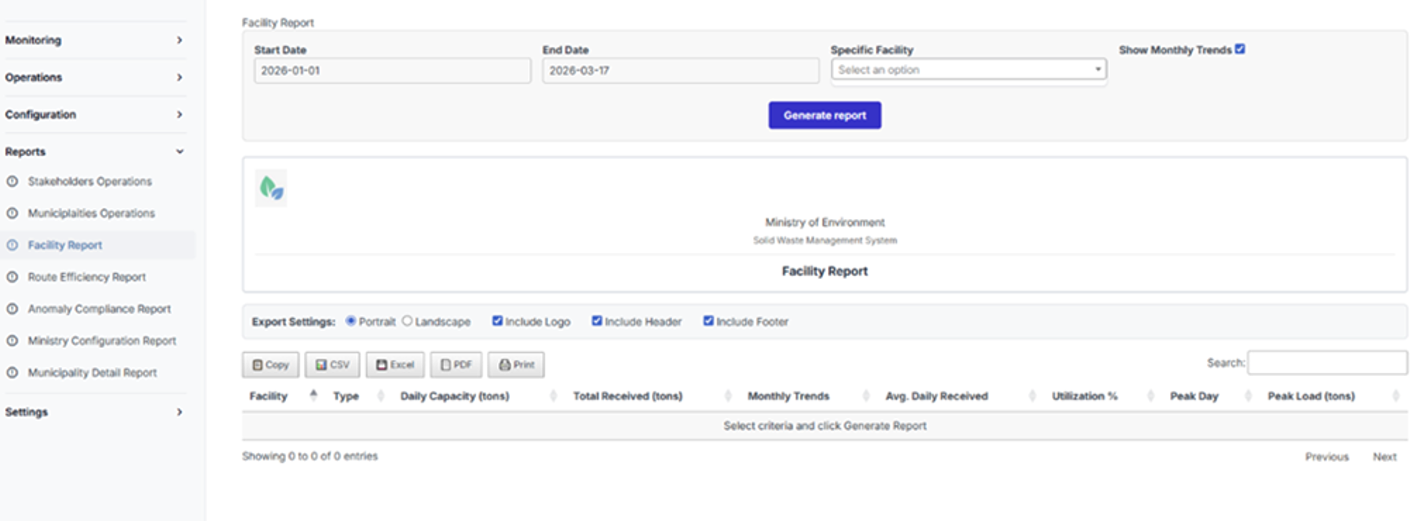
Facility Capacity and Utilization Report page
5.3.4 Route Efficiency Report
The Route Efficiency Report provides analytical insights into the performance of waste collection routes. It enables users to evaluate route efficiency, identify underperforming or overloaded routes, and support optimization of collection planning.
Purpose
To assess the operational efficiency of waste collection routes based on activity levels, transported volumes, and defined performance indicators.
Parameters
| Parameter | Description |
|---|---|
| Date Range | Select start date and end date for the reporting period. |
| Efficiency Metric | Select the metric used to rank routes (e.g., number of collections, total transported weight). |
| Minimum Collections | Define a threshold to exclude routes with low activity from the analysis. |
Output Metrics
The report provides route-level performance indicators, including:
- Route – Identifier or name of the route
- Collections (Count) – Total number of collection operations performed
- Total Weight (Tons) – Aggregate volume of waste transported
- Efficiency Score – Calculated metric based on selected efficiency criteria
Use Case
This report is primarily used by operations managers and planners to optimize route planning, improve resource allocation, and identify routes that require adjustment due to inefficiencies or excessive load.
Steps to Access the Report
- Navigate to تقارير (Reports).
- Select تقرير كفاءة المسارات (Route Efficiency Report).
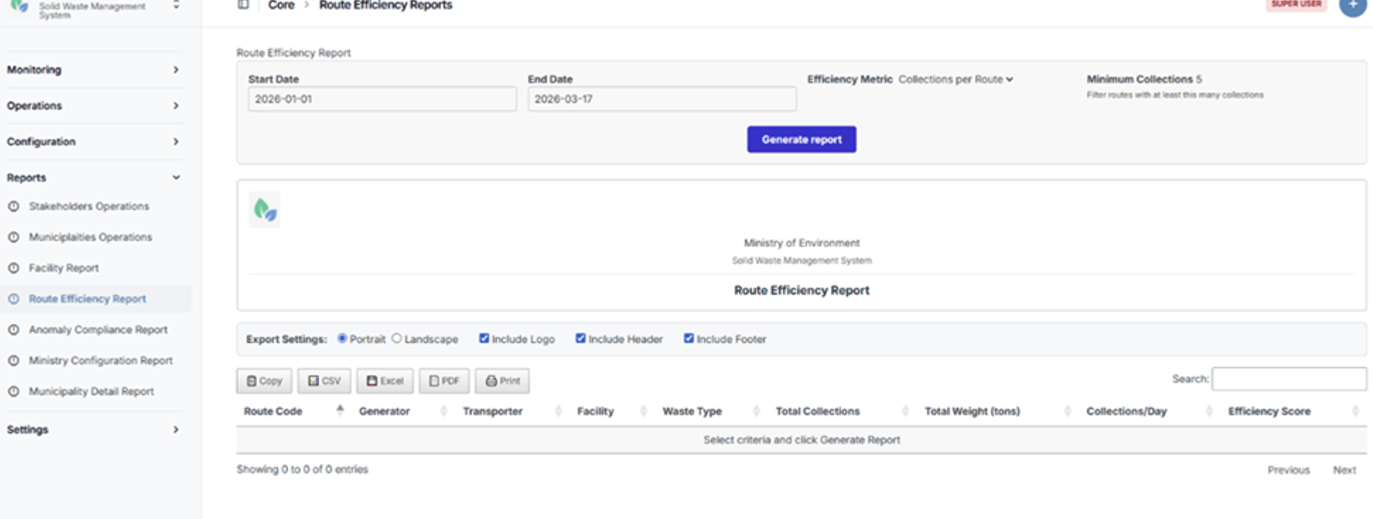
Route Efficiency Report page
5.3.5 Anomaly and Compliance Report
The Anomaly and Compliance Report provides a comprehensive view of detected irregularities in waste collection and transfer operations. It enables users to monitor compliance, investigate anomalies, and support regulatory enforcement.
Purpose
To identify, track, and analyze manifest anomalies in order to ensure compliance with operational and regulatory standards.
Parameters
| Parameter | Description |
|---|---|
| Date Range | Select start date and end date for the reporting period. |
| Include Resolved | Option to include previously resolved anomalies in the report results. |
| Minimum Severity | Filter anomalies by severity level (Low+, Medium+, or High only). |
Output Metrics
The report includes the following key data fields:
- Manifest ID
- Date
- Anomaly Type
- Severity Level
- Description
- Transporter
- Facility
- Weight (Tons)
Anomaly Detection
The system automatically flags anomalies based on predefined thresholds and validation rules, including:
- Overweight Loads
Loads exceeding permitted or configured weight thresholds (High severity). - Underweight Loads
Loads below expected operational thresholds, potentially indicating inefficiencies or data inconsistencies (Medium severity).
Use Case
This report is primarily used by compliance officers and regulatory authorities to investigate irregularities, audit transporter and facility behavior, and ensure adherence to weight regulations and operational standards.
Steps to Access the Report
- Navigate to تقارير (Reports).
- Select تقرير المخالفات والامتثال (Anomaly and Compliance Report).
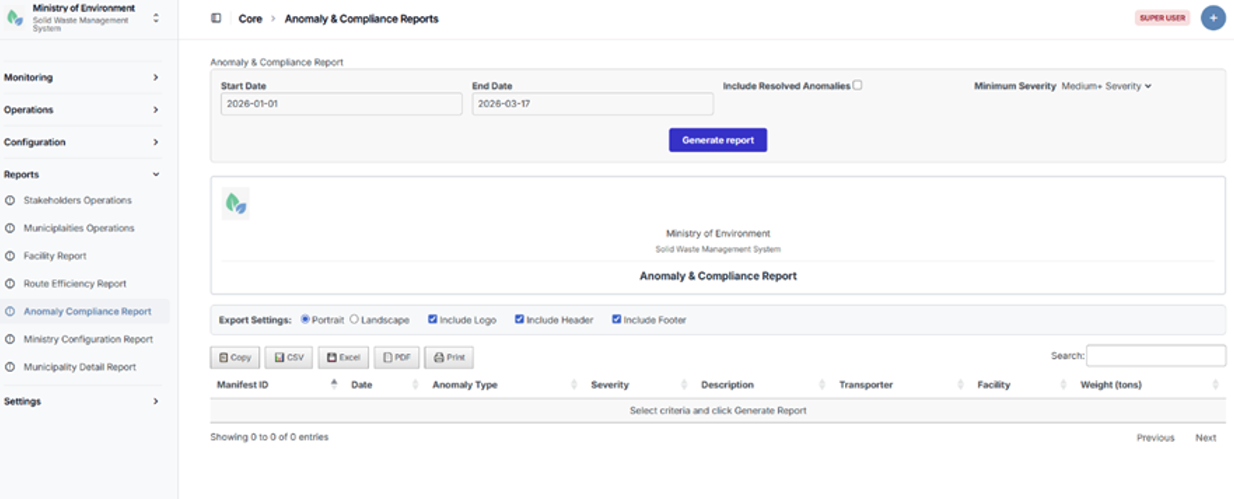
Anomaly and Compliance Report page
5.3.6 Ministry Configuration Overview Report
The Ministry Configuration Overview Report provides a high-level analytical view of all registered entities and operational infrastructure within the system. It supports strategic oversight by summarizing key data across municipalities, stakeholders, and facilities.
Purpose
To provide decision-makers with a consolidated overview of system coverage, resource distribution, and operational readiness across the waste management ecosystem.
Parameters
| Parameter | Description |
|---|---|
| Group By | Select the aggregation level: Municipality, Stakeholder Type, or Facility Type. |
| Include Inactive | Option to include deactivated or inactive entities in the report. |
| Minimum Stakeholders | Filter municipalities based on a minimum number of registered stakeholders. |
Output Metrics
Depending on the selected grouping, the report provides the following outputs:
Grouped by Municipality
- Municipality Name
- Municipality Type
- Total Stakeholders
- Generators
- Transporters
- Facilities
- Active Routes
- Assigned Vehicles
- Assigned Drivers
- Last Activity
Grouped by Stakeholder Type
- Stakeholder Type
- Total Count
- Active Count
- Municipalities Covered
- Average per Municipality
Grouped by Facility Type
- Facility Type
- Total Facilities
- Total Capacity (Tons/Day)
- Average Capacity (Tons/Day)
- Municipalities Served
Use Case
This report is primarily used by Ministry officials for strategic planning, coverage analysis, and resource allocation. It helps identify service gaps, assess infrastructure distribution, and support data-driven policy decisions across municipalities.
Steps to Access the Report
- Navigate to تقارير (Reports).
- Select وزارة البيئة (Ministry Overview).
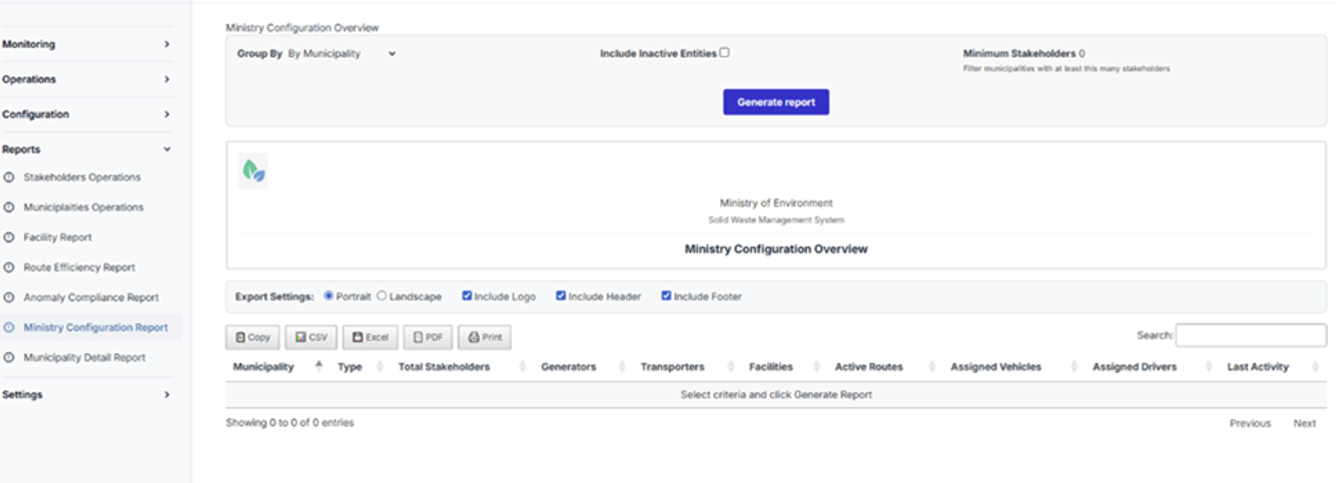
Ministry Configuration Overview Report page
5.3.7 Municipality Detail Report
The Municipality Detail Report provides a detailed view of a specific municipality’s registered entities and operational resources. It enables users to drill down into infrastructure components and assess operational readiness at the municipal level.
Purpose
To analyze and review all entities and resources associated with a selected municipality, supporting detailed audits, monitoring, and operational planning.
Parameters
| Parameter | Description |
|---|---|
| Municipality | Select the municipality to be analyzed. |
| Entity Type | Select the type of data to display: Stakeholders, Vehicles, Drivers, or Routes. |
| Status Filter | Filter results by Active, Inactive, or All entities. |
| Show Contacts | Option to include contact information in the report output. |
Output Details
The report output varies based on the selected entity type:
Stakeholders
- Entity Type
- Name
- Code
- Subtype
- Status
- Location
- Contact Information (if enabled)
Vehicles
- Vehicle Type
- Plate Number
- Capacity (Tons)
- Operator (Transporter)
- Assignment Status
- Associated Waste Types
Drivers
- Driver Name
- License Number
- Mobile Number
- Operator (Transporter)
- Assignment Status
Routes
- Route Code
- Generator
- Facility
- Transporter
- Waste Type
- Status
- Expected Quantity (Tons/Day)
Use Case
This report is used by municipal administrators to review their operational setup and by Ministry users to audit municipal infrastructure, verify resource allocation, and assess readiness for waste management operations.
Steps to Access the Report
- Navigate to تقارير (Reports).
- Select البلديات (Municipalities).
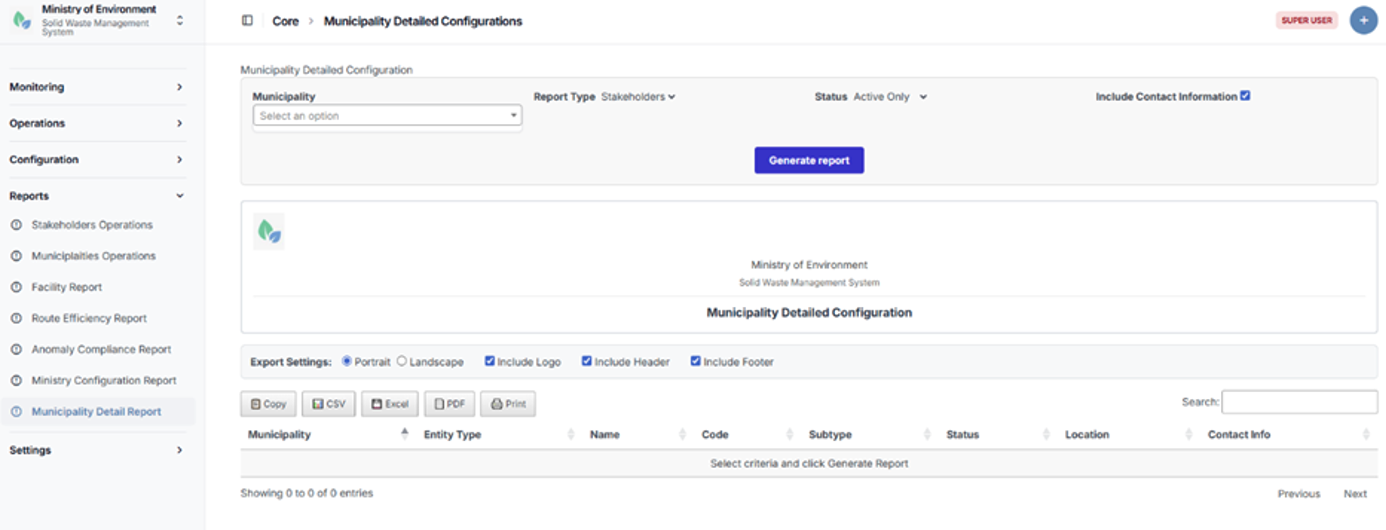
Municipality Detail Report page
5.4 Settings
Overview
The Settings module contains the system’s reference and master data configurations. These settings define the administrative, geographic, and operational classifications used throughout the platform.
They ensure data consistency, enable accurate filtering, and support standardized reporting across all modules of the system.
The Settings module includes the management of the following elements:
- Governorates
- Districts
- Cadasters
- Groups (User Roles and Permission Groups)
- Waste Types
Access Control
Access to the Settings module is restricted to authorized administrative users, typically:
- System Administrators
- Ministry Administrators
This ensures that only designated users can modify core reference data that impacts system-wide operations.
Adding a New Settings Record
To create a new record (e.g., Governorate, District, Cadaster, Group, or Waste Type), follow these steps:
- Navigate to Settings.
- Select the relevant category.
- Click the “+” (Add New) button.
- Complete all required fields (marked with *).
- Enter any additional optional details as needed.
- Click Save to create the record.
5.4.1 Governorates
The Governorates section manages the highest-level administrative geographic divisions within the system.
This section enables authorized users to define and maintain governorate records, which serve as the primary geographic framework for organizing municipalities and related operational data.
Steps to Access Governorates
- Navigate to الإعدادات (Settings).
- Select المحافظات (Governorates).
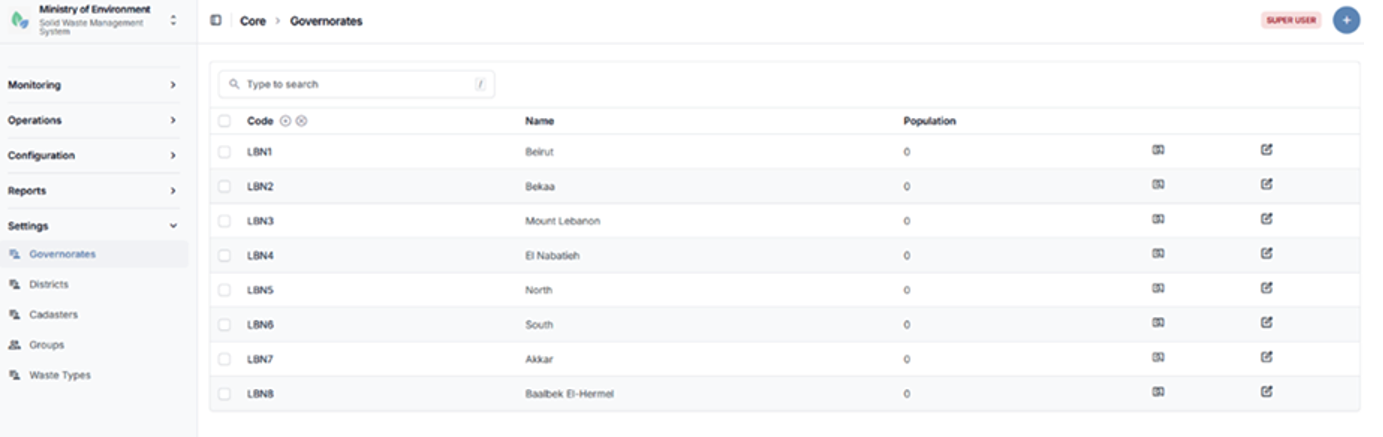
Governorates listing page
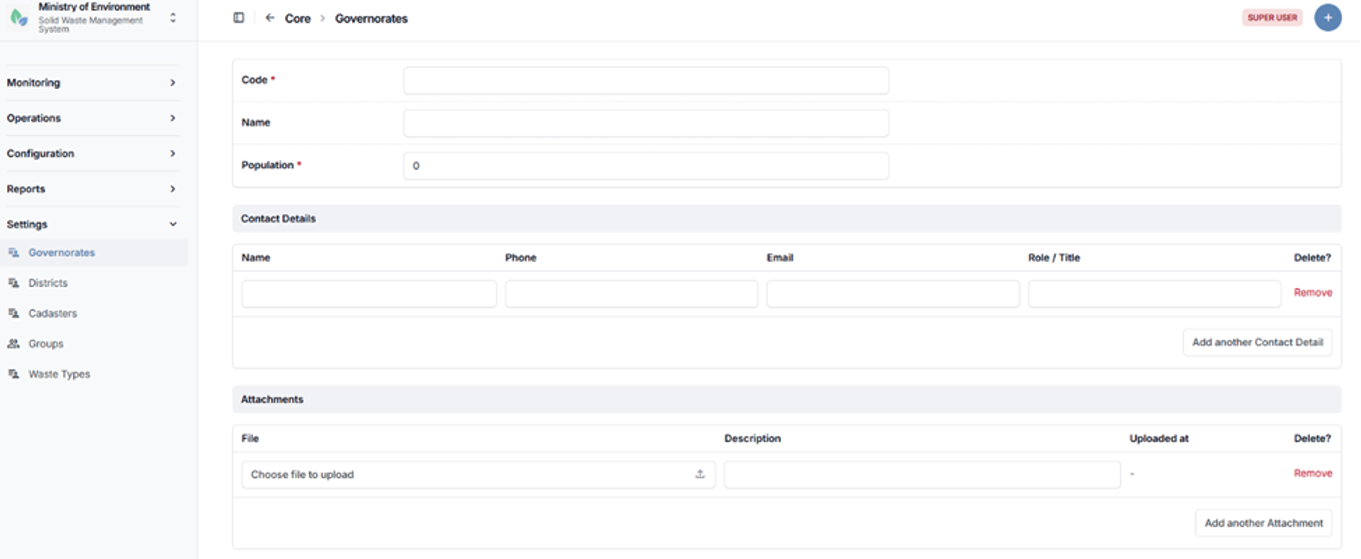
Governorate creation form
5.4.2 Districts
The Districts section manages administrative subdivisions under governorates within the system.
Each district is linked to a specific Governorate, ensuring a structured geographic hierarchy that supports accurate data organization, filtering, and reporting.
This section allows authorized users to create, update, and manage district records as part of the system’s geographic configuration.
Steps to Access Districts
- Navigate to الإعدادات (Settings).
- Select الأقضية (Districts).
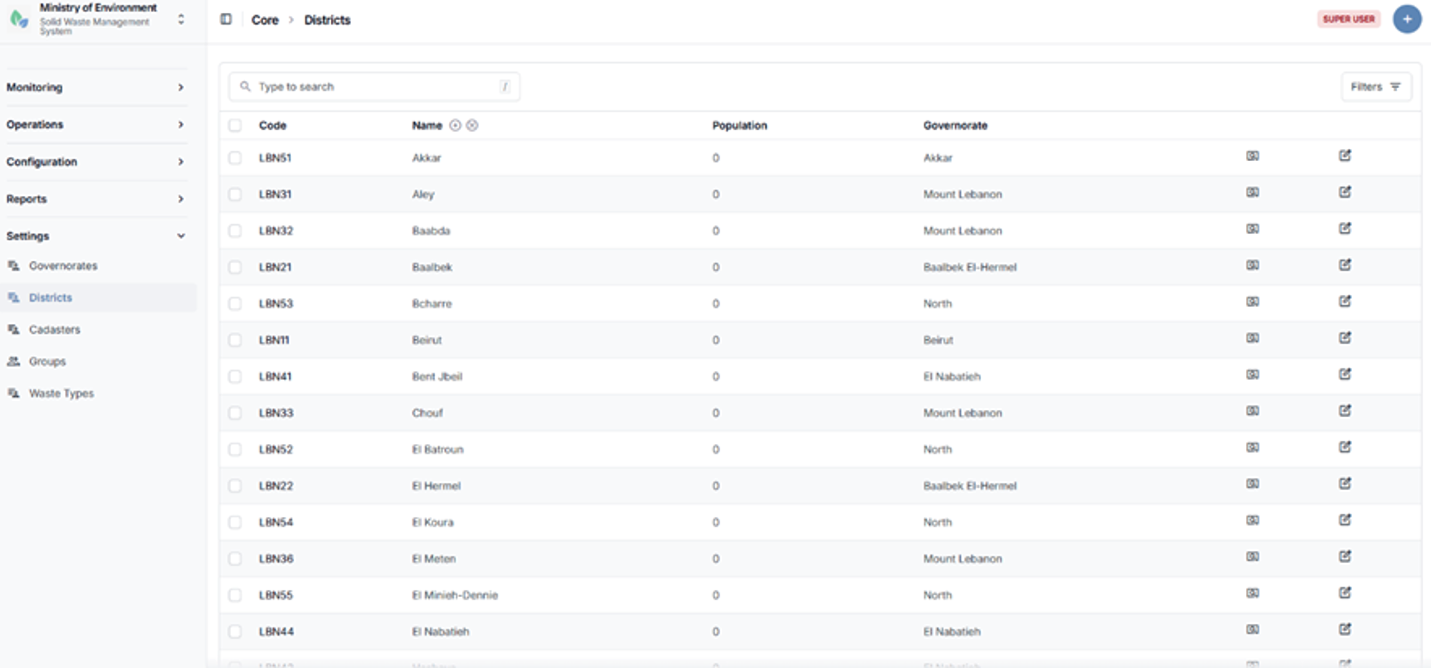
Districts listing page
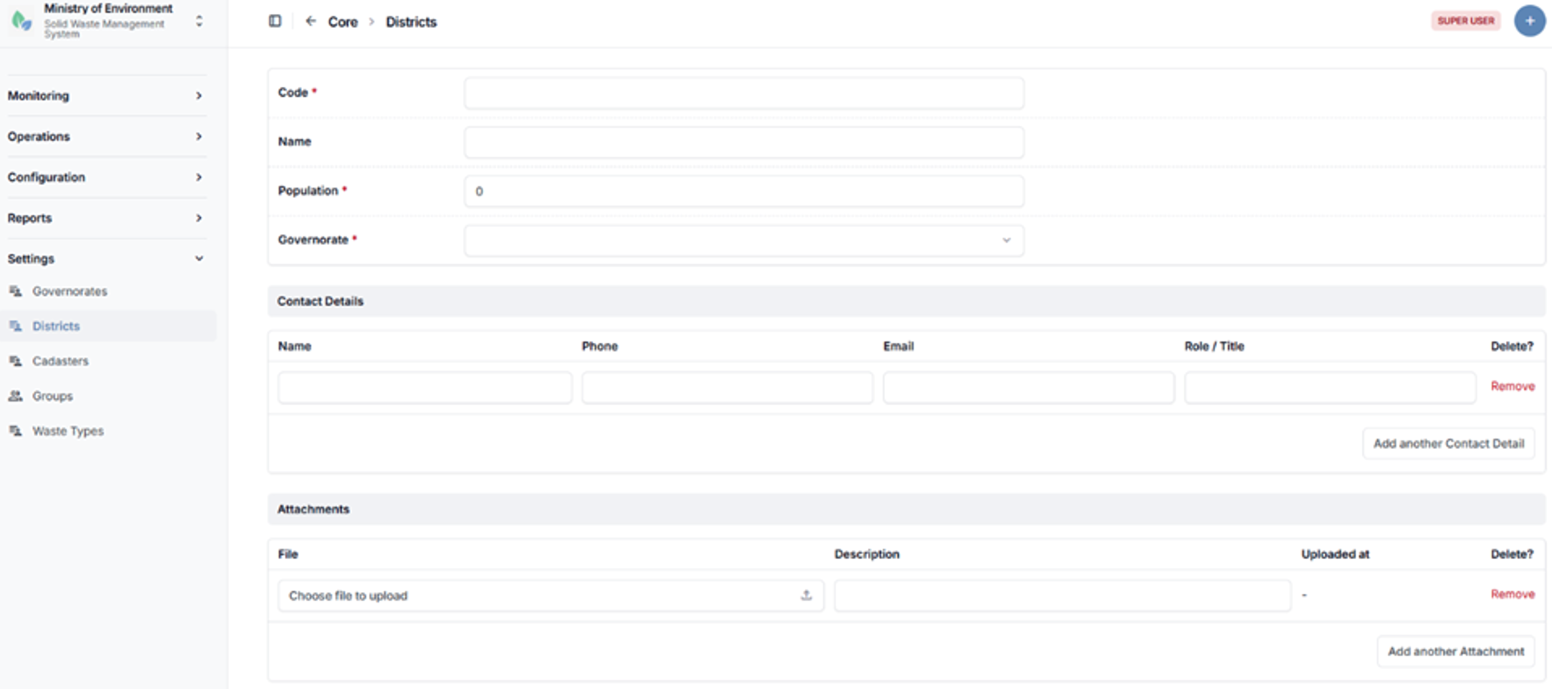
District creation form
5.4.3 Cadasters
The Cadasters section manages detailed geographic subdivisions within districts, forming the lowest level of the administrative geographic hierarchy in the system.
Cadasters enable precise location mapping and support accurate spatial referencing for operational and reporting purposes.
They are used to define the geographic location of:
- Municipalities
- Waste Management Facilities
- Waste Generators
- Complaint Reports and Incident Locations
Each cadaster must be linked to a specific District, ensuring consistency within the geographic hierarchy (Governorate → District → Cadaster).
Steps to Access Cadasters
- Navigate to الإعدادات (Settings).
- Select المساحات العقارية (Cadasters).
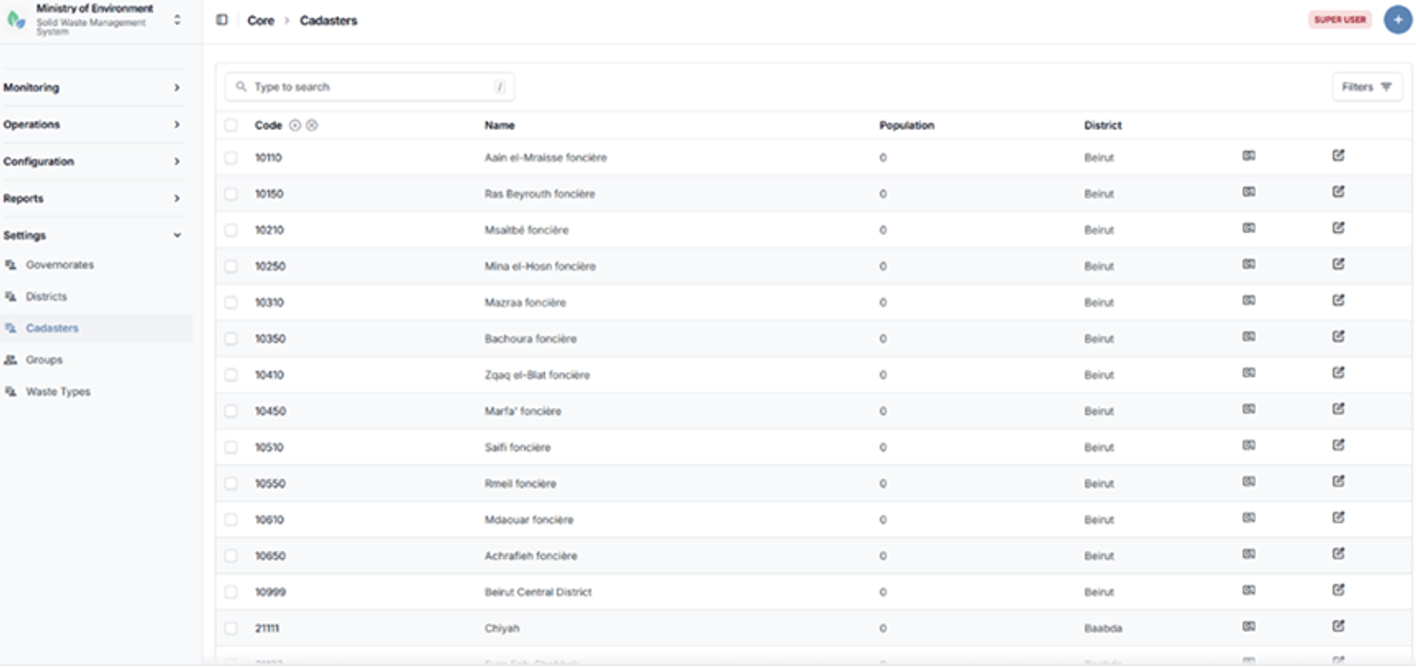
Cadasters listing page
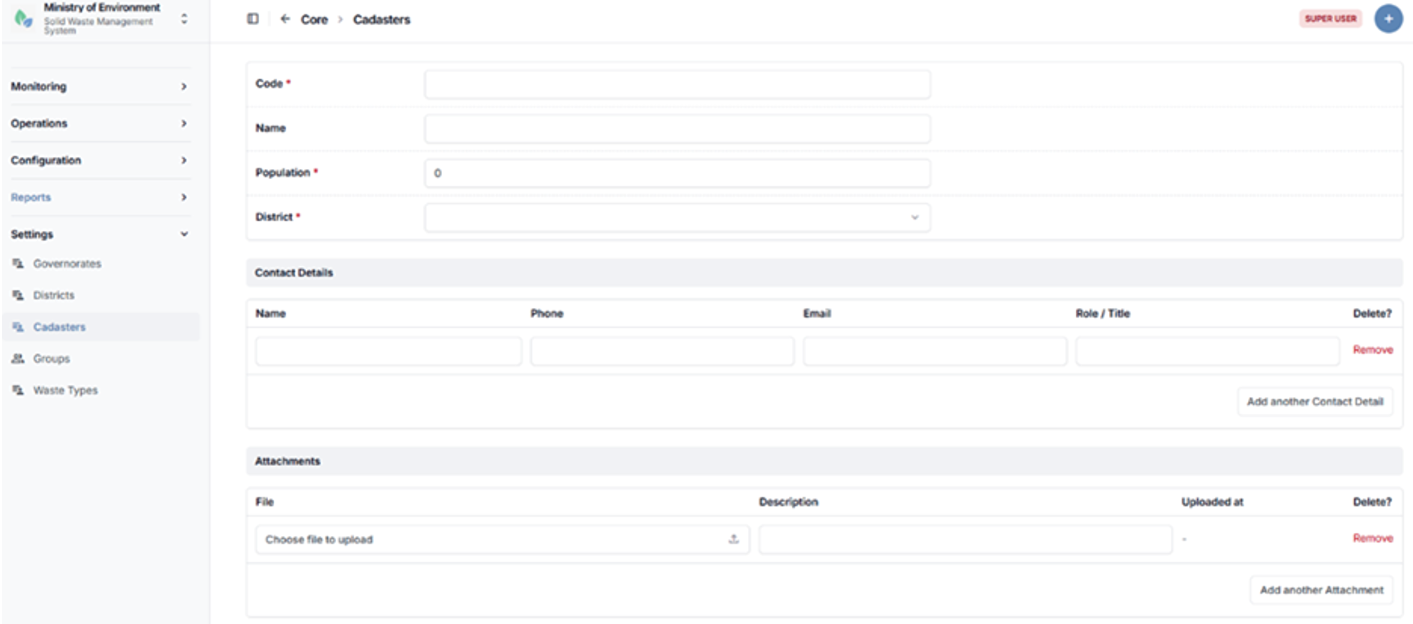
Cadaster creation form
5.4.4 Groups (User Roles & Permission Groups)
The Groups section manages user roles and permission groups within the system.
Groups define the system’s role-based access control structure and determine which modules, features, and actions are accessible to each user. This ensures that users can only access data and functionalities relevant to their role and responsibilities.
Each group is configured with a set of permissions that control access to:
- System modules and features
- Data visibility and scope
- Actions such as create, edit, approve, or delete
This section allows administrators to create, modify, and manage user roles to align with organizational structures and operational requirements.
Steps to Access Groups
- Navigate to الإعدادات (Settings).
- Select المجموعات (Groups).
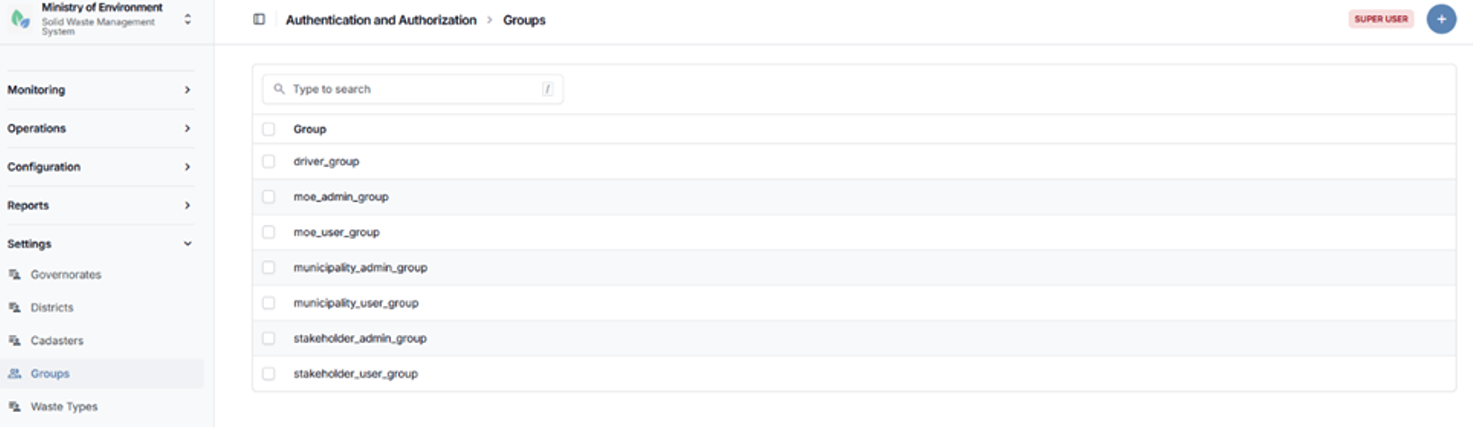
Groups (User Roles & Permission Groups) listing page
5.4.5 Waste Types
The Waste Types section defines and manages the categories of waste handled within the system which are defined by the Integrated Solid Waste Management Law Number 80 dated 18 October 2018.
Waste types are used to classify waste across all modules, including collection, transport, treatment, reporting, and analytics. Proper classification ensures consistency in data entry, supports accurate filtering, and enables standardized reporting and analysis.
This section allows authorized users to create, update, and maintain waste type definitions in alignment with regulatory and operational requirements.
Steps to Access Waste Types
- Navigate to الإعدادات (Settings).
- Select أنواع النفايات (Waste Types).
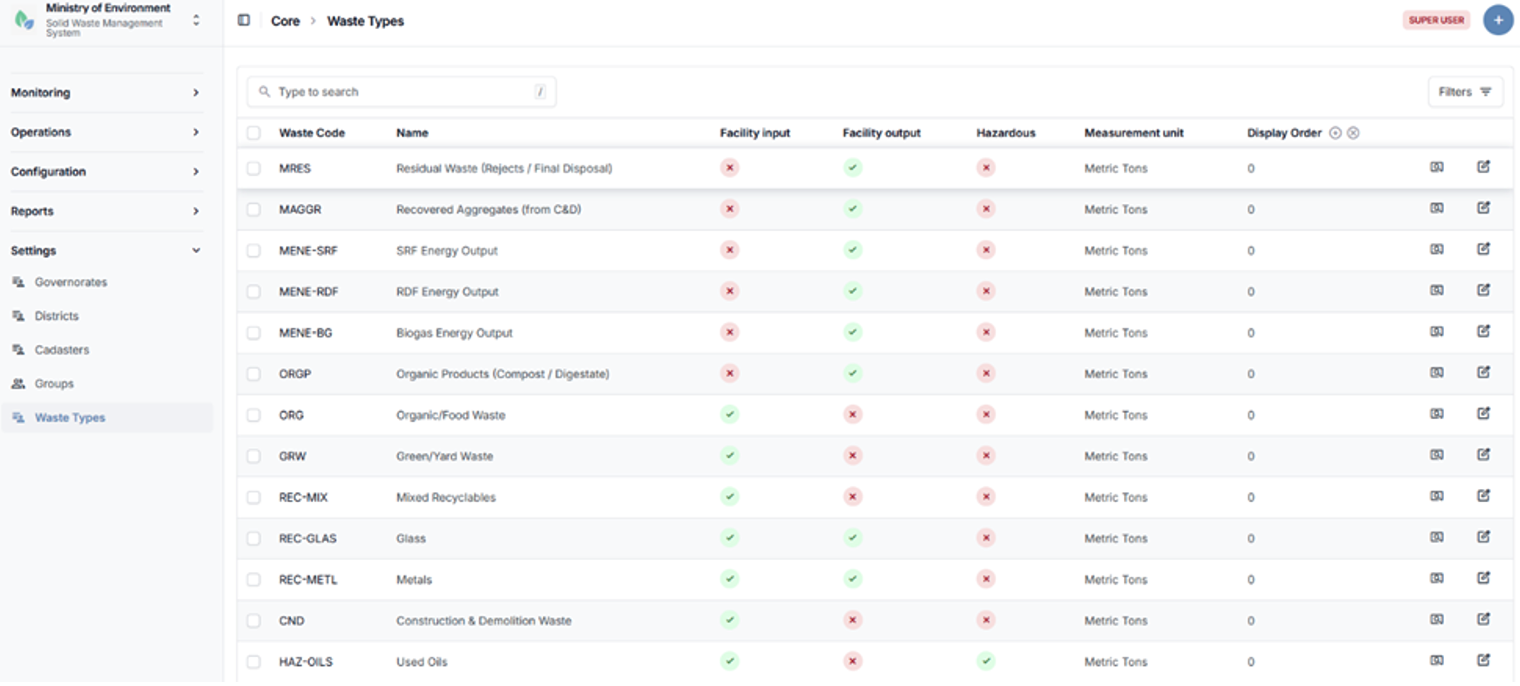
Waste Types listing page
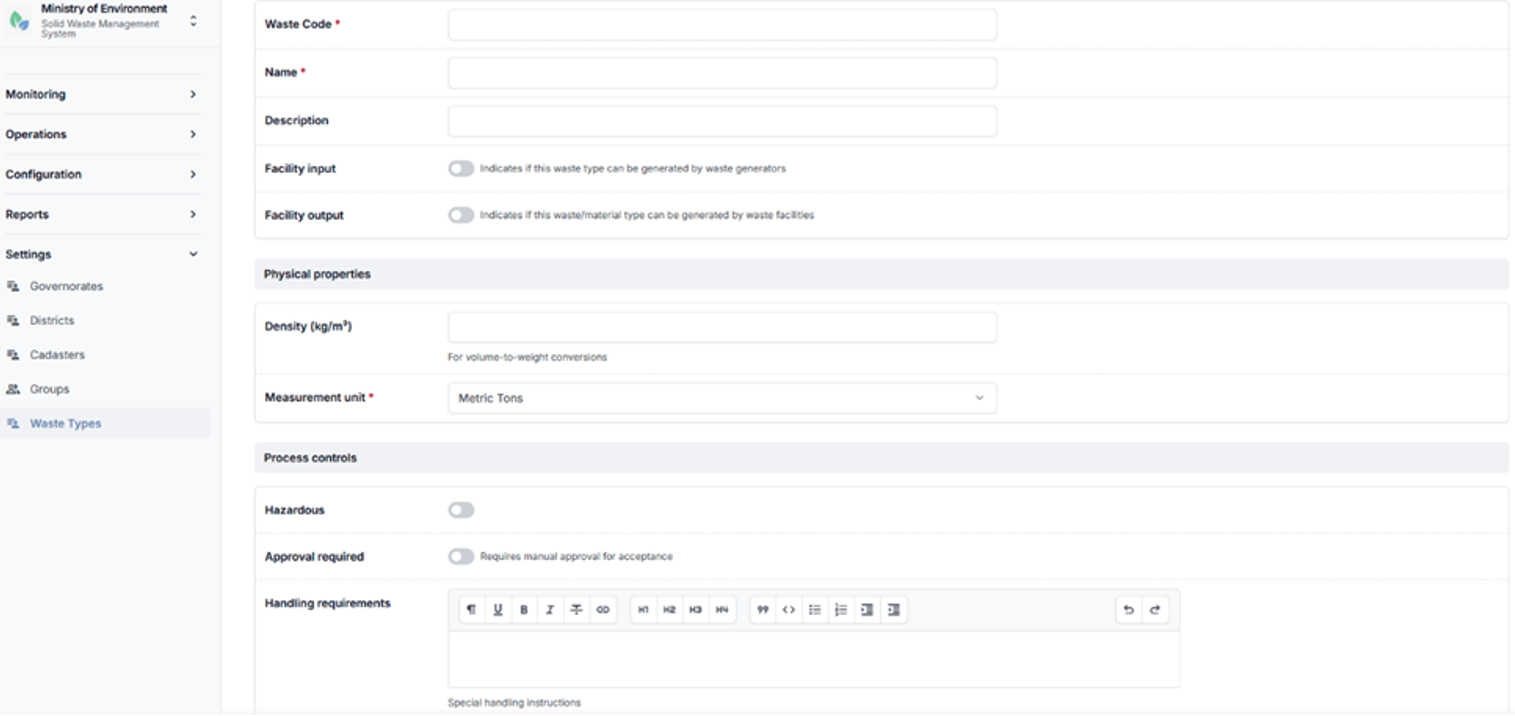
Waste Type creation form